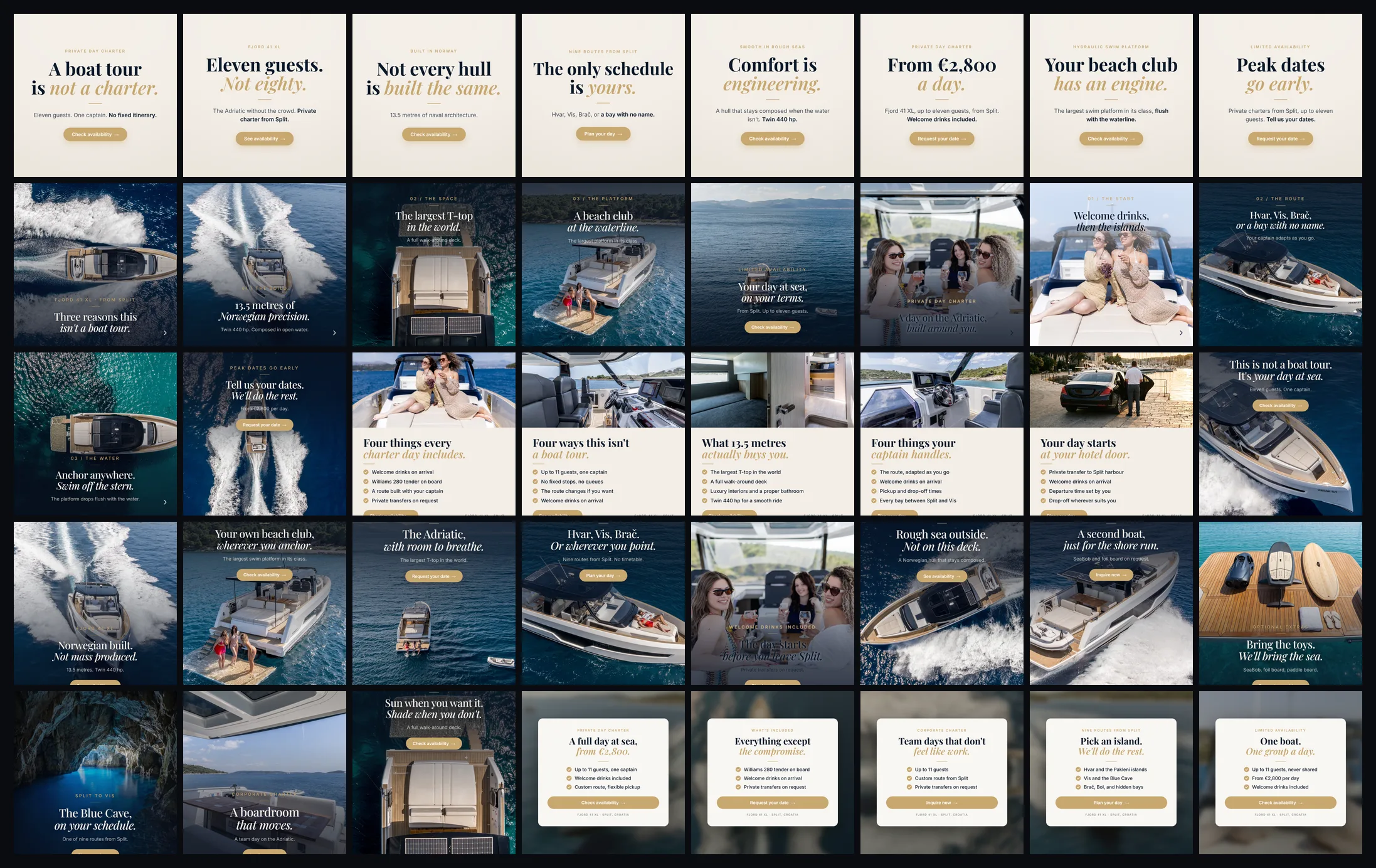
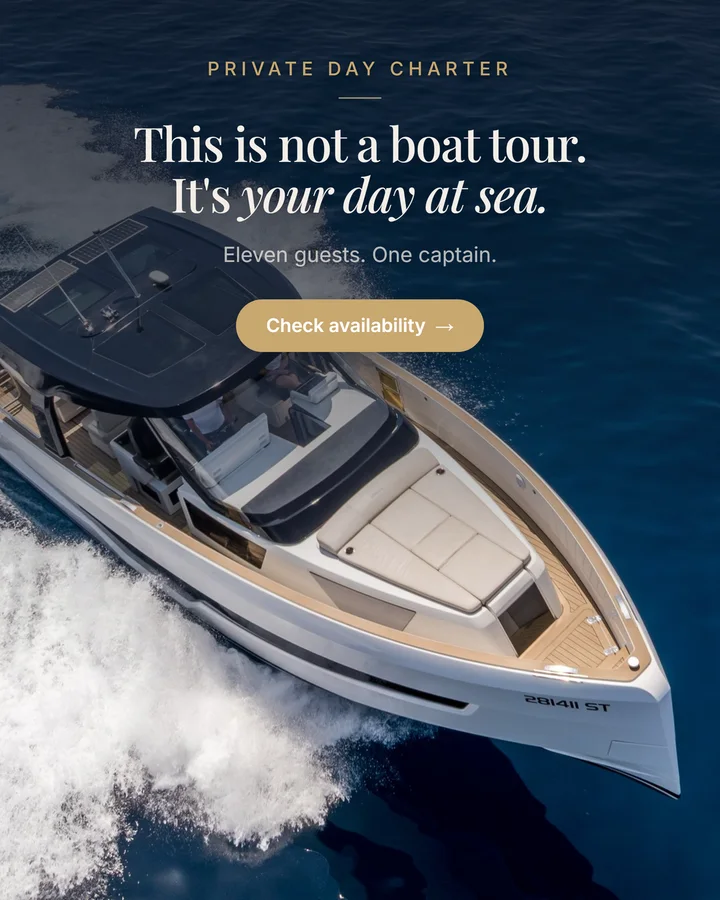
Give a model your product and a good prompt and it hands back something great. Ask for the same product forty times and you get forty near-misses: a logo it redrew, a hex that drifted, a headline it respelled. 90% right is fine for one image. Across forty ads it is forty rewrites. Here is the HTML method that makes ad 40 as on-brand as ad 1, step by step, every prompt and file included.
40ads from one spec file
39shipped without a rewrite
0logos drawn by a model
$0.24API spend on the batch
real client accountHTML + CSS → PNGkit included
01 · THE PROBLEM
One lucky image is a demo, not a campaign
Every AI ad tool is graded on ads per dollar. Wrong number. The only one that counts is ads that ship without a rewrite. Ask for one hero image and you get something good. Ask for forty and the misses land in the same six places:
The logo, redrawn, 90% correct
A hex that drifted off-palette
A headline respelled
The product, proportions subtly wrong
A face that is nearly that person
Invented text on the packaging
A client will not say "the latent space drifted". They will say "that's not our chair". Worse is when nobody notices and it runs.
To be fair to the models: a good one can hold a product. Nano Banana Pro takes eight reference images and keeps proportions convincingly. But count the cost: 3-6 angles, 1024px minimum, identity prompting, references in the right slots, and iteration until it lands. That is a workflow for one hero image, not for forty, and forty is the job.
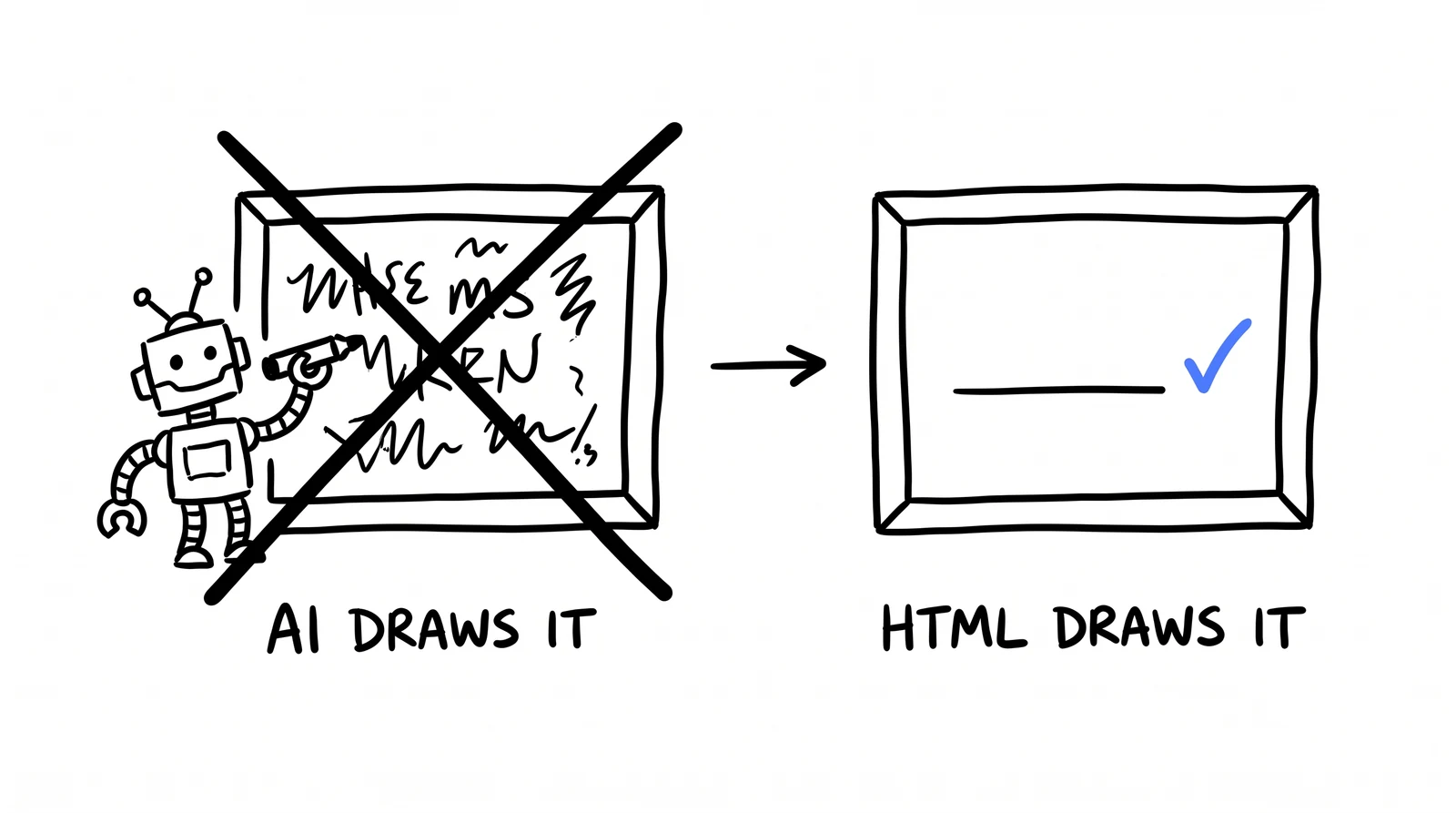
So we stopped asking. The photo never reaches a model: it goes in as a file, a browser composites real type over it, code places the real logo.
40 ads, one real client account, one afternoon. every photo is theirs, to the pixel.
37 cost nothing to render. Three used a model at ~8 cents, the whole $0.24. Zero used a model on anything the client owns.
02 · THE RULE
The model only gets what nobody owns
a model may invent. it may never reproduce.
Everything below follows from one line. Anything that exists and belongs to someone (photo, face, product, logo, words) is placed by code. Anything that belongs to nobody (a scene, a sky) is generated. Split it there and you stop asking a model to be accurate, which it cannot promise at volume, and only ask it to be plausible, which it is superb at.
The model invents
An empty scene. No text, nothing owned. That is the whole job description.
The photo is placed
Straight in as a file. It never reaches a model, so there is no mechanism by which it could change.
The logo is composited
A real PNG, positioned by code. A model-drawn logo is 90% right: close enough to ship, wrong enough to notice.
The type is rendered
Real HTML text in the real brand font. It cannot be misspelled by something that never touched it.
We learned the last one the expensive way. Asked to draw a finished dental ad, the model wrote "ŽUBNO". The Croatian word is "ZUBNO": an invented diacritic, on the most important word in the creative.
STEP 1 · BRAND TRUTH
Take the hexes off their live site
One file per brand, injected as CSS custom properties at render time, so no template hardcodes a colour. Read the values off their real site. Do not eyeball them. Inspect the CSS, pull the exact hexes and fonts. A theme built from guesses looks almost-but-not-quite like the client, which is worse than generic.
theme.json
{
  "name":        "Their Brand",
  "brand":       "#0E2237",   // primary. read it off their site, do not eyeball it
  "accent":      "#C2853F",   // ONE highlight: accent words, checks, CTA fill
  "ink":         "#0A1829",   // dark text on light surfaces
  "paper":       "#F4EFE8",   // the light surface
  "onPhoto":     "#FFFFFF",   // text over photography
  "fontDisplay": "\"Montserrat\", system-ui, sans-serif",   // billboards, checklists
  "fontSerif":   "\"Playfair Display\", Georgia, serif",     // editorial headlines
  "fontSans":    "\"Inter\", system-ui, sans-serif",         // body, labels, CTAs
  "fontsHref":   "https://fonts.googleapis.com/css2?family=...",
  "radiusCta":   "999px",     // 999px = pill, 14px = squared
  "logo":        "logo.png"   // THE REAL LOGO, composited in code.
                              // never drawn by a model. ask them for vector.
}
Get it right and all forty are on-brand by construction, not by luck. Get it wrong and all forty are wrong the same way.
STEP 2 · THE PICTURE
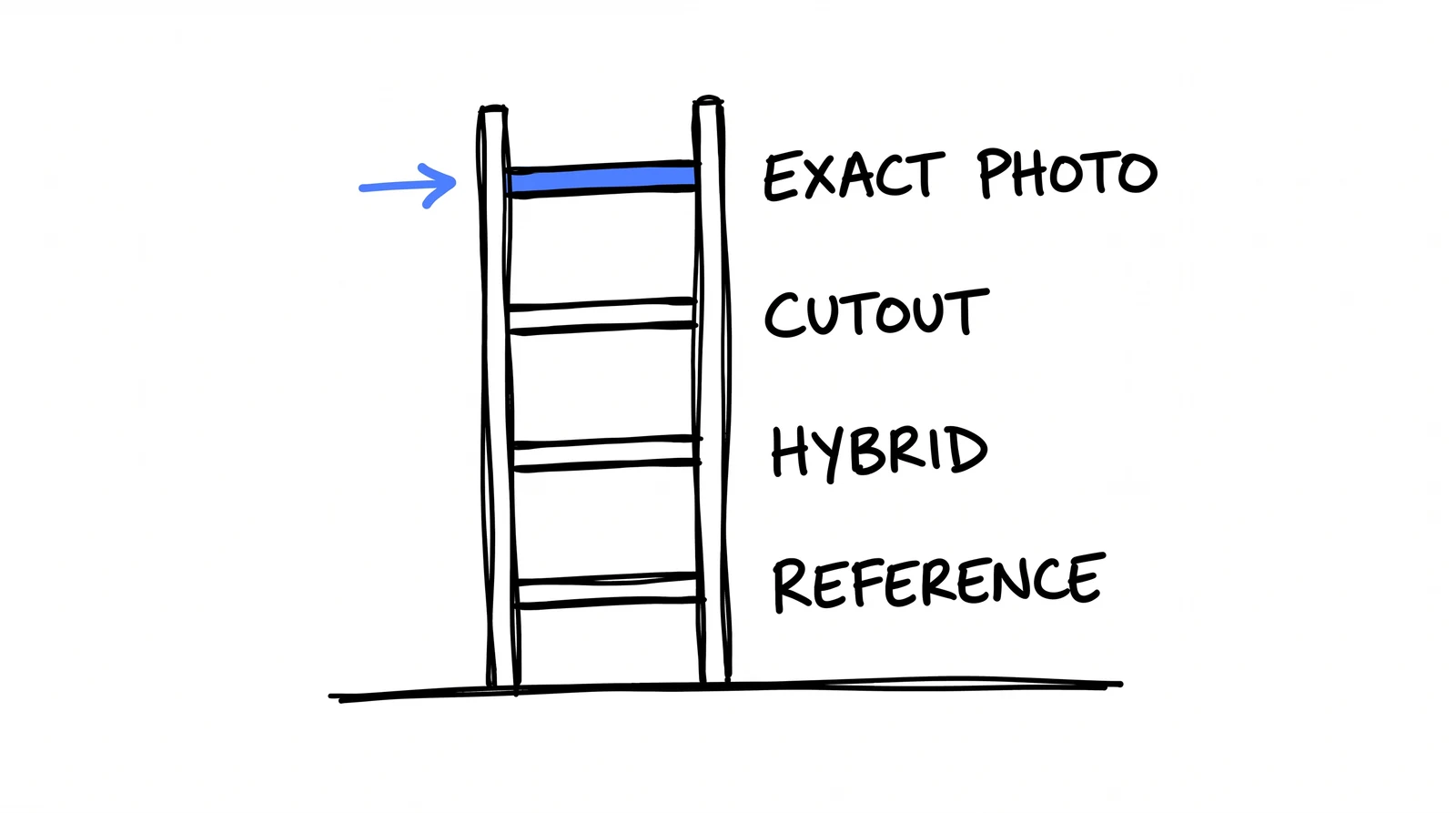
Decide how much the model may invent
one question asked four ways. start at the top.
Drop a rung only when the one above cannot work. Most people start at the bottom because it feels like the AI thing to do, then wonder why it looks like AI.
rung 1Exact photo
Invents nothing. Their photo goes in as a file and comes out identical. Type lands on the calm part of the frame. 29 of our 40. If your client has photos, this is the answer.
$0.00 · ~4s per ad · 0 pixels altered
rung 2Cutout
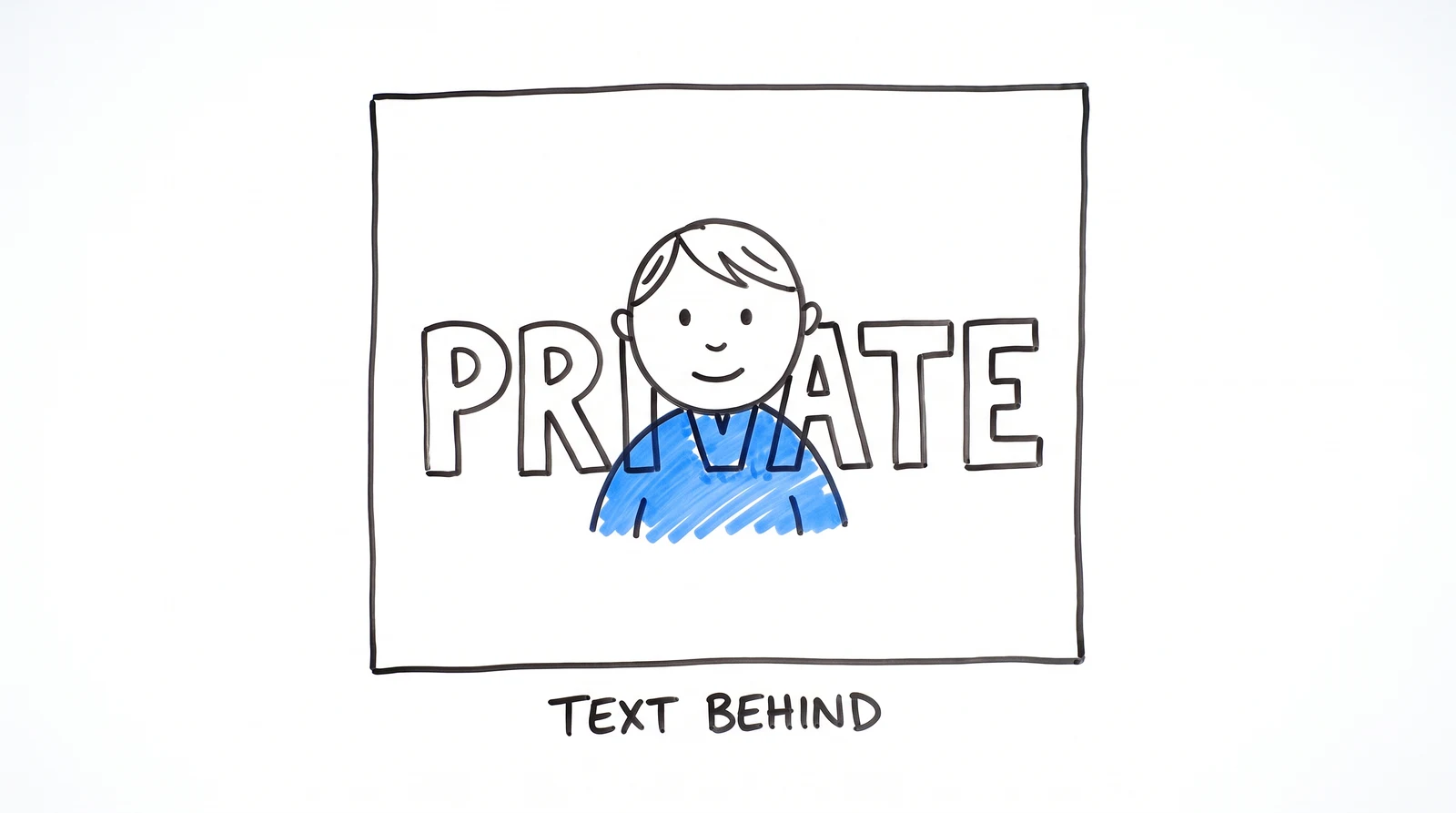
Still invents nothing. The subject is cut from the background on your machine, a giant word goes behind their head. An alpha matte over the original pixels: arithmetic, not generation. A real face stays their face.
$0.00 · runs locally · 0 pixels altered
rung 3Hybrid
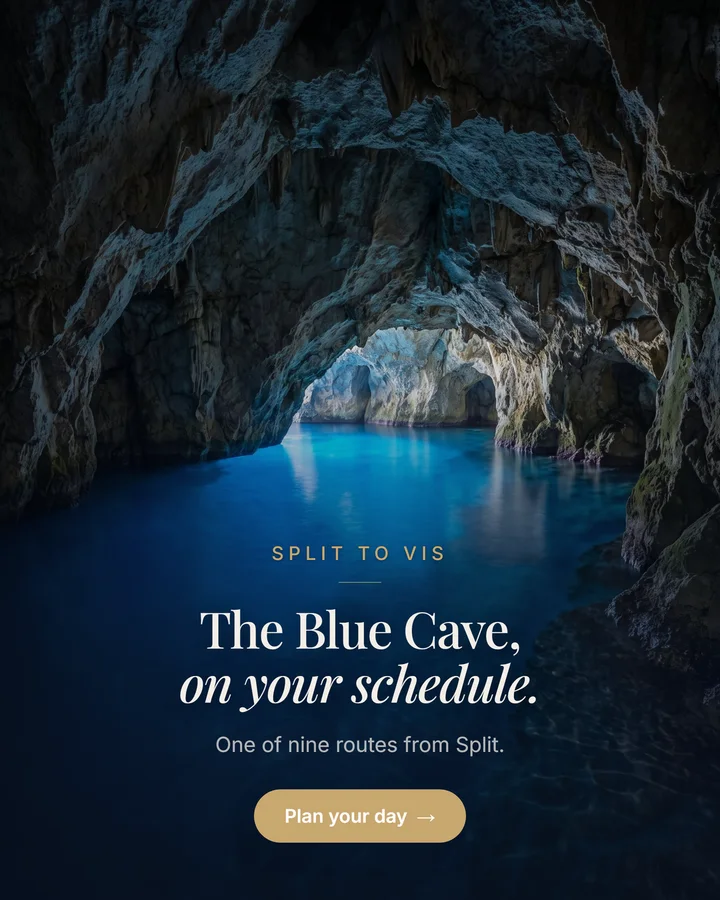
No usable photo, so the model invents the scene only, under a hard no-text guard, and real type goes on top. 3 of our 40, including a sea cave we never photographed.
~$0.08 per ad
rung 4Reference-driven next video
Hand it a design you already approved and tell it to follow that exact system. A reference disciplines it where prompt wording cannot: it reproduced Croatian letter-perfect, diacritics and all, twice running. The one place model-drawn copy is reliable. Ban the logo, composite the real one after. Different job, different rules, its own lesson.
~$0.08 per ad · 0 used in this batch
rung 2 is the one people assume must be AI. it is the one that never touches a model.
The guard that makes rung 3 safe
Appended to every scene prompt. Without it, models sneak signage and watermarks into an otherwise clean scene.
no-text-guard.txt
ABSOLUTELY NO text, NO letters, NO numbers, NO logos, NO watermarks,
NO signage anywhere in the image.
A real scene prompt
The line doing the work: "the lower half of the frame is calm glowing blue water, completely empty, clean negative space for text". You are not describing a picture, you are reserving a place for the headline. Name what you do not want, too: left alone, a model puts a tourist boat in your empty cave.
scene-prompt.txt
Photographic interior of a Mediterranean sea cave. The water glows an
intense luminous cobalt blue, lit from below through an underwater opening.
Dark grey limestone walls and ceiling frame the top and both sides of the
frame. The lower half of the frame is calm glowing blue water, completely
empty, clean negative space for text. No boats, no people, no equipment,
no railings, no ropes. Natural light only, deep saturated blue, cool
shadows, long-exposure clarity, high-end travel photography.

[the no-text guard above is appended automatically]
rung 1: their real photo. free.
rung 3: the cave is invented. 8 cents.
Same batch, same spec, same template. One photo is real, one scene never existed. You cannot tell. Neither can the buyer.
STEP 3 · THE SPEC
Write the ads as data
an ad is data, not a document
Each concept is an object: template, photo, copy, size. Forty objects, one command, forty PNGs. That is what makes a change free: "the CTA should say Check availability" is one string and a three-minute re-render. In a canvas tool it is an afternoon. Carousel cards are always 1080×1080 or Meta centre-crops your headline off.
spec.json — two of the forty
{
"client": "Your Client",
"concepts": [
{
"name": "fl-01-not-a-boat-tour",
"render": "html",
"template": "first-layout",
"sizes": ["4:5"],
"photo": { "type": "local", "path": "gallery/g013.jpg" },
"spec": {
"bg": "photo",
"scrim": "vignette",
"eyebrow": "PRIVATE DAY CHARTER",
"headline": "This is not a boat tour.\nIt's *your day at sea.*",
"subhead": "Eleven guests. One captain.",
"cta": "Check availability",
"ctaStyle": "solid"
}
},
{
"name": "carousel-a-01-cover",
"render": "html",
"template": "first-layout",
"sizes": ["1:1"], // carousels are ALWAYS square"photo": { "type": "generate", "prompt": "<text-free scene>" },
"spec": { "headline": "Three reasons this\nisn't a *boat tour.*" }
}
]
}
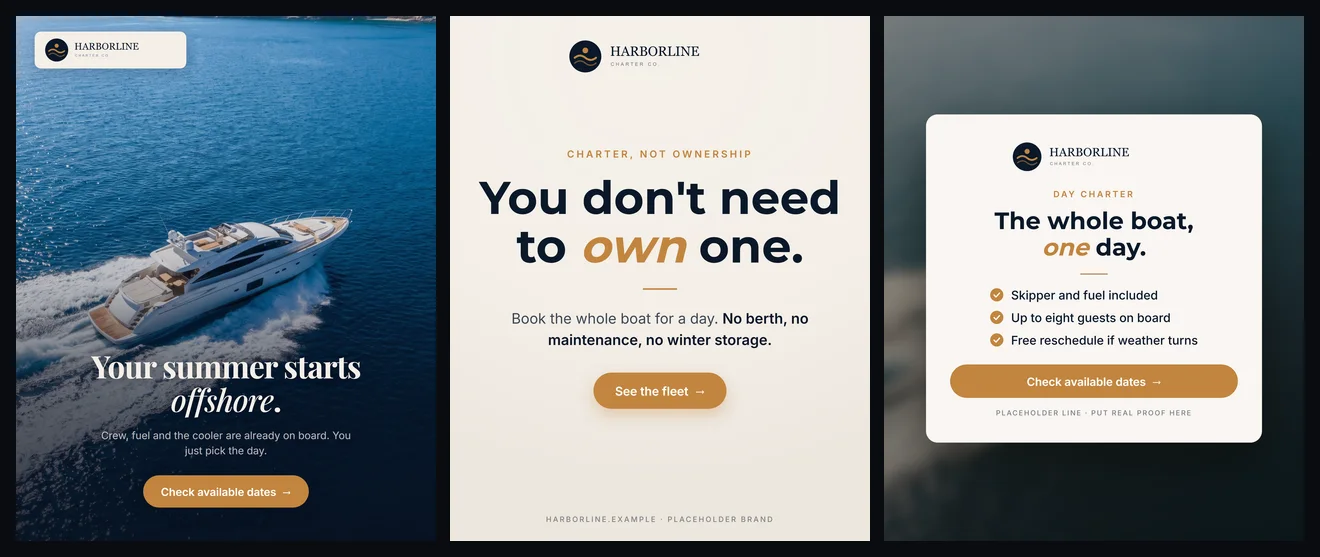
One rule for the batch: make it argue with itself. Forty variations of one hero is not forty ads, it is one ad with forty haircuts. Ours ran 12 photo heroes, 8 billboards, 5 offer cards, 5 checklists, 10 carousel cards. The billboard tests the claim, the hero sells the feeling, the checklist handles the sceptic.
STEP 4 · RENDER
A browser is the design tool
Templates are HTML and CSS. A headless Chromium screenshots them at 1080px, sharp writes the PNG. That is the whole renderer, and it is why the type is perfect: it is just a web page. No design tool, no subscription, no editor. The expensive part of ad production was never the pixels. It was a human retyping a headline forty times.
Generating forty is the easy half. The half nobody films is opening every one and scoring it against a rubric, because a render succeeding tells you nothing about whether the ad is good. Under 8/10 gets fixed and re-rendered.
26/40first pass
35/40after fixing the template
39/40after fixing what that broke
1flagged, not shipped quietly
Pass 1 found a real bug. The gold eyebrow was hardcoded at 21.6px, under our own 28px floor. Fine on dark water, gone on a white hull. Eight ads failed on that alone, and on one the eyebrow was the brand mark.
Pass 2: the fix broke four ads. A bigger subhead wrapped, dropping an orphaned word onto bright photo. One went 9 → 7. Move a number, and four things you were not thinking about move with it.
The fortieth stays at 7. The best interior shot in the client's whole library is a photo of a cabin door. No prompt fixes that. The honest output is a note to the client: send us one good interior photo.
Never let the machine be the last one to see the work. A pipeline that renders forty and declares victory is a random number generator with good typography.
TAKE THE WHOLE THING
The kit, not a screenshot of the kit
ads-kit.zip
Renderer, five real templates, the Krea client, a working spec, a sample photo. Unzip, install two deps, run one command. The exact-photo path needs no API key.
ads-kit/
README.md install and run in under 2 minutes
SKILL.md runnable, dependency-free
design-skill-original.md the REAL skill, scrubbed
generate.mjs spec + theme → PNGs
render.mjs HTML → 1080px PNG
krea.mjs Nano Banana, scenes onlytemplates/first-layout, billboard, offer-card,checklist-split, cutout-hero
theme.example.json the file from step 1
spec.example.json six concepts, mixed patterns
sample.jpg
The sample is a made-up brand and an AI-generated boat: a client's photos are not ours to put in a zip. Everything else is the real engine.
The actual skill, not a version of it
.claude/skills/design/SKILL.md
The real file off our machine, the one that produced the forty ads above. Not a rewrite. The only edits are automated: client names, domains and IDs scrubbed by a script. Everything else is what our Claude Code reads, incident notes included. It is long because real ones are long.
SKILL.md
---
name: design
description: Design ad creatives and social visuals matched to a client's OWN brand/website, using a library of named Layouts — the quiet-luxury "First Layout" editorial PLUS a direct-response family (cutout-hero with text-behind-subject, checklist-split symptom listicle, billboard statement, offer card). EXACT-PHOTO FIRST — composites the client's REAL gallery photos with real typography (HTML/CSS→Chromium PNG, no model ever touches the image); a local WASM CUTOUT path removes the background from real staff photos for the "designer cutout" look; a HYBRID path generates text-free AI scenes (nano-banana) and puts real HTML type + the real logo on top; a REFERENCE-DRIVEN path clones an approved past design (passed to Krea as an image reference) with new copy — generated WITHOUT a logo, the real logo composited in code after. Builds a brand theme (colors/fonts/logo, derived from the client's live site) for new clients first, grades output via vision, uploads to the client's Drive, posts to Slack. Use for "design for X", "make a static/creative for X", "use this exact photo for the ad", "match their site", "napravi vizual za X", "/design".
user-invocable: true
argument-hint: "[ClientName] [--mode new|clone|photo] [--layout first-layout] [--brief \"...\"] [--photo <path|driveId>] [--ref <driveFolderId>] [--sizes 4:5,1:1] [--lang hr|bs|en|de]"
---

# /design — the Layout design system

Produces finished ad creatives / social visuals on a client's own brand, drawn from a
**Layout library** (named, reusable design systems). It is the **exact-photo** engine:
the client's real photo is composited with real typography and the type is placed by a
content-aware engine — so the result uses ONLY their photos and looks like their site,
not a generic AI generator. (Formerly "a teammate-design".)

**Render paths (decision ladder, 2026-07-07):**

1. **EXACT-PHOTO (default, the Layouts):** the client's real photo is a full-bleed `<img>`
   and the typography is real text composited over it via headless Chromium — the photo is
   NEVER sent to a model. [`lib/design_layout.mjs`](../../../ACME Agency/scripts/lib/design_layout.mjs)
   reads each photo and places the headline/CTA on the calm band away from the subject, in
   the right color, with an overlay only where needed. Pick a Layout (e.g. `first-layout`).
2. **CUTOUT (exact-photo variant):** `photo:{type:"cutout", path|id}` background-removes the
   subject LOCALLY (WASM alpha matte over the original pixels — safe for real staff photos,
   `lib/design_cutout.mjs`), hardens the matte (kills halo fringe) and trims it, then the
   `cutout-hero` template layers a giant display word BEHIND the subject's head. The
   strongest differentiated pattern for local-service clients with staff photos.
3. **HYBRID (generate scene → HTML type):** `photo:{type:"generate", prompt}` + any HTML
   template. nano-banana invents ONLY a **text-free** scene (a NO-TEXT guard is appended
   automatically; scenes are cached by prompt hash so re-runs don't reroll the composition);
   all copy + logo are real HTML on top. Use when no real photo fits the message.
   **This replaces full-generative for most cases** — the model drawing Croatian copy is
   what produced the "ŽUBNO" hallucination (ACME Agency, 2026-07-07).
4. **REFERENCE-DRIVEN generative (the strong full-generative):** when an approved
   designer-made reference exists (a past a teammate design for the client, or any design
   the user hands over), pass it to nano-banana via `imageUrls` and prompt "follow the
   reference image's exact design system" + the verbatim copy strings + **"do NOT draw
   any logo/brand mark — leave the top-left clean"**, then composite the real logo via
   `lib/design_logo.mjs`. The reference disciplines the model: layout, hierarchy AND
   exact HR diacritics come out right (ACME Agency 2026-07-07: 2/2 first-try, graded 9/10
   and 8/10). This is Faris's preferred way to produce "more ads like this one" — a
   reference image beats any text-only prompt.
   - **Cross-client transfer works:** an approved design for one client + a brand-restyle
     block ("replace every navy with ink #1E2025, every gold with olive #80885B…") =
     the same architecture on another client's brand (ACME Agency → ACME Agency, first try).
   - **Chaining works:** the approved output (the RAW no-logo version) becomes the
     reference for the next concept — the design system self-propagates with new copy
     + a new scene (ACME Agency ref-03).
   - **Specify EVERY text region verbatim or explicitly ban it** ("there is NO headline
     and NO title — the ONLY text is the 4 list items"). An unspecified text region
     comes back as gibberish ("Hatoma injlicite srat…", ACME Agency ref-02).
   - **Use `model:"google/nano-banana-pro"`** for reference-driven concepts —
     noticeably crisper letterforms than the default nano-banana-flash
     (`lib/krea.mjs generateImage({model})`, added 2026-07-07).
5. **PHOTO-SLOT (AI layout + real photo inserted in code):** prompt the model to draw
   the full layout with a **completely EMPTY flat solid placeholder frame** (one
   uniform color, rounded corners, realistic drop shadow) instead of a photo, then
   `lib/design_slot.mjs` `detectFlatSlot()` finds the frame and `insertPhotoIntoSlot()`
   cover-crops the REAL client photo into it (rounded corners + subtle warm match) —
   the person's pixels never touch a model, and the AI-drawn shadow grounds the photo.
   The answer to "AI keeps changing the doctor's face" (ACME Agency slot-01, 2026-07-07).
5. **GENERATIVE unreferenced (last resort):** nano-banana draws the whole ad from a text
   prompt alone; real logo still composited in code. This is what produced the "ŽUBNO"
   hallucination — expect letterform/diacritic risk, vision-check every word.

Decision: real photos → exact-photo/cutout. Approved reference design + "make it like
this" → reference-driven generative (no logo in the generation, composite after). No
usable photo, no reference → hybrid. Unreferenced full-generative only with explicit
reason.

**This is the visual sibling of `/ACME Agency-deck`** (which writes copy decks in the house deck voice).
Same shape: the `designer` agent makes the design judgment (which Layout, which photos,
the on-image copy), a deterministic script (`design_generate.mjs`) renders + ships it.

## Layout library

| Layout | id | What it is |
|---|---|---|
| **First Layout** | `first-layout` | Quiet-luxury **editorial** matched to a client's live site — serif headline (roman + *italic*), eyebrow caps labels, cream/navy/photo backgrounds. Now supports `logoChip` (logo top-left — REQUIRED on ads), `ctaStyle:"solid"` (filled accent pill — the feed-ad default; ghost = website look), `scrim:"left"/"liftleft"` (vertical band for left-column type), `colWidth`. Best for premium-brand heroes + hybrid scenes. |
| **Cutout hero** | `cutout-hero` | **DR pattern:** giant display word + subject cutout layered on top (text-behind-head). Needs `photo:{type:"cutout",…}`. `mode:"light"/"dark"`, `wordSize`, `subjectH`. Keep ≥60% of the word legible around the head. |
| **Checklist split** | `checklist-split` | **DR pattern:** warm photo top (~47%) + paper panel with "N tiha znaka …" headline, ≤4 check rows, solid CTA, domain. The policy-safe educational symptom ad for health verticals. |
| **Billboard** | `billboard` | **DR pattern:** one loud TRUE statement in large serif on paper, support line, solid CTA. No photo. Best hook-tester ("Zubi se ne gube od starosti."). |
| **Offer card** | `offer-card` | **DR pattern:** crisp card (logo, headline, ≤3 checks, full-width CTA, trust line) over a blurred client photo. ACME Agency + retargeting closers. Trust line: REAL facts, in the ad's language. |

(Older single-purpose templates — `photo-hero`, `photo-caption`, `realestate-spec`,
`event-poster`, `brand-panel` — still exist for their niches.)

**Batch rule:** a ACME Agency batch should MIX patterns (1 cutout-hero + 1 checklist +
1 billboard + 1 photo-hero beats 4 look-alike editorial heroes). Polished editorial
alone reads "website hero" and underperforms in feed — that was the exact failure of
the first ACME Agency set.

## When to trigger
- "design for <client>" / "napravi vizual(e) za <klijent>" / "match their site"
- "make a static / creative / social visual for <client>"
- "use THIS exact photo for the ad" / "koristi baš ovu sliku" (→ mode `photo`)
- "use their gallery photos" / "designs that match their website" (→ a Layout, exact-photo)
- "new client, build the brand look + first designs" (→ mode `new`)
- "make new designs from <client>'s old ones" (→ mode `clone`)
- "/design <Client> …"
- NOT for: video ads (cinematic/heygen/motion/video-edit), copy decks (`/ACME Agency-deck`,
  `/copywrite`), landing pages (`/landing`), or batch 40-ad runs where brand fidelity
  doesn't matter (`/static-ad-generator`). Prefer this skill whenever the bar is
  "must look like our designer made it" or "must use the client's exact photo".

---

## Phase 0 — Parse inputs & pick the mode
Extract `client` (required; if missing, ask once), `--mode`, `--brief`, `--photo`
(local path or Drive id), `--ref` (Drive folder of past designs), `--sizes`
(default `4:5`), `--lang`.

> **Carousel cards are ALWAYS square (1:1 / 1080×1080), never 4:5.** A Meta carousel
> renders every card inside a fixed square frame; a 4:5 card gets ACME Agency-cropped and
> the headline/CTA at the top and bottom are silently lost. When a concept is a
> carousel card, set `"sizes": ["1:1"]` on that concept in the spec. The renderer
> also enforces this as a backstop — any concept named `carousel-*` (or with
> `"carousel": true`) is forced to 1:1 even if the spec says otherwise — but author
> it as 1:1 so the design is composed for a square from the start.

Auto-detect the mode if not given:
- A real photo provided / referenced ("use this photo") → **photo**.
- Client has past a teammate designs in Drive and the ask is "more like those" → **clone**.
- Client has no `design-theme.json` and no design history → **new**.

Resolve the client via the 3-step cascade (`ACME Agency/CLAUDE.md`): `clients.json`
→ Sheet registry → API discovery. Load `CLIENT.md`, `brand-dna.md`, `design-theme.json`
if present.

---

## Phase 1 — Mode-specific context

### Mode `new` (no assets yet)
1. Resolve the brand: client logo (Drive/local via `ensureClientLogo`, view it with
   vision), website (Firecrawl), any questionnaire in the client folder.
2. Write `ACME Agency/clients/<Client>/brand-dna.md` (voice, audience, colors,
   adjectives) if it doesn't exist.
3. Write `ACME Agency/clients/<Client>/design-theme.json`:
   `{ brand, accent, accent2, ink, paper, onPhoto, logo, fontDisplay, fontSans, fontsHref }`.
   **Verify colors + font from the real source** (the site's CSS via Firecrawl/curl +
   the logo pixels) — never eyeball or invent. The logo: if the supplied file has a
   baked-in background (unusable for overlay), build a clean code-rendered badge (see
   the ACME Agency example: an SVG/HTML→PNG of the mark in the real font + colors) and point
   `logo` at it. **Ask the client for a transparent vector logo.**

### Mode `clone` (reuse her past work)
1. Find the client's recent designs in Drive (`--ref` folder, or search the client
   folder / owner a you@example.com). Download the best 2–4 and **view them (vision)**.
2. Extract the theme (colors, accent usage, fonts feel, recurring layout) → write/
   update `design-theme.json`.
3. These designs are also the style reference for generation — note their look so the
   agent's `scene` prompts match her established direction.

### Mode `photo` (exact client photo → HTML render)
1. Get the photo(s): `--photo` local path, or a Drive id (download), or a folder.
2. The photo is used UNCHANGED via `render:"html"` + `photo:{type:"local"|"drive",…}`.
   Never route a must-be-exact photo through generation.
3. **Don't hand-prep photo size.** Drop the photographer's raw export straight into
   the spec — `design_render.mjs::toDataUri` auto-downscales anything >2 MB or wider
   than 2400 px to a 2000 px long edge (q85) before the base64 embed, preserving PNG
   alpha for cutouts. This keeps full ad fidelity (final canvases are 1080–1350 px)
   while preventing the Chromium OOM (exit 137) that raw 20–40 MB drone/HDR JPEGs
   caused. No ffmpeg pre-pass needed.

---

## Phase 2 — Delegate design judgment to the `designer` agent
Invoke the **`designer`** subagent (Task tool). Pass: the client, the mode, the
brief/copy, the resolved theme path, photo source(s), `--sizes`, `--lang`, and
`reference_files` = STYLE_GUIDE.md + design.tests.md + the client's CLIENT.md/brand-dna/
design-theme.json. The agent:
- chooses the render path per concept via the decision ladder (exact-photo/cutout →
  hybrid text-free scene → full-generative only with reason) and MIXES patterns
  across the batch (cutout-hero / checklist-split / billboard / offer-card / hero),
- writes the on-image copy in a teammate's register (accent word, ≤3 checks, one CTA),
- writes the **design spec** to `ACME Agency/clients/<Client>/design_spec_<date>.json`
  and returns its path + a one-line summary per concept.

Do not hand-author the spec yourself — let the agent design. (See the agent file for
the spec contract; templates self-document their fields in
`.claude/skills/design/templates/`.)

---

## Phase 3 — Render
```bash
node ACME Agency/scripts/design_generate.mjs \
  --client "<Client>" --specs ACME Agency/clients/<Client>/design_spec_<date>.json \
  --no-upload --no-slack
```
Renders each concept × size to `ACME Agency/clients/<Client>/designs/<date>/`.
(`--list-templates` shows valid template ids.) The photo is composited exactly; HR/BS
diacritics render perfectly because the type is real text.

---

## Phase 4 — Grade & iterate (quality gate)
Re-invoke **`designer`** on the rendered PNGs to grade against `design.tests.md`
(vision). For any concept < 8/10, apply its revised spec and re-render that concept.
Loop until all ≥ 8 or you've done 3 passes (then flag the gap — never silently ship
off-style).

---

## Phase 5 — Upload & deliver
Re-run Phase 3 WITHOUT `--no-upload --no-slack` (or once, after grading passes):
```bash
node ACME Agency/scripts/design_generate.mjs \
  --client "<Client>" --specs <spec.json>
```
This uploads the finals to the client's Drive (`<ClientFolder>/Designs/<date>/`)
and posts to the client Slack channel. For a richer Slack post, route the summary
through the `slack-reporter` agent. Always output the Drive folder link to the user.

---

## Verification
- [ ] Render mode right per concept — exact-photo/cutout for real photos; hybrid (text-free generated scene + HTML type) when no photo; full-generative only with explicit reason
- [ ] `design-theme.json` exists with **verified** brand colors + font (from site CSS + logo pixels, not eyeballed)
- [ ] Logo present + correct on EVERY creative (composited PNG; never model-drawn). Transparent vector logo requested if missing
- [ ] On-image copy correct verbatim; HR/BS diacritics intact; one CTA per creative; ≤20 words on image
- [ ] It reads as an AD, not a website hero: one loud message, solid CTA, headline ≥72px-at-1080 equivalent
- [ ] Cutouts: no halo fringe, transparent margins trimmed, ≥60% of the giant word legible around the head
- [ ] Hybrid scenes: text-free (no model-drawn letters anywhere), wardrobe/prop colors specified in the prompt
- [ ] Policy (health verticals): no personal-attribute questions, no before/after, no guarantees, no invented proof
- [ ] No gibberish text (don't put real copy in fake in-app screenshots)
- [ ] Grading pass run; every shipped concept ≥ 8/10 (or gap flagged loudly)
- [ ] Finals uploaded to `<ClientFolder>/Designs/<date>/`; Drive link surfaced
- [ ] Slack posted to the client channel

## Key files
| File | Purpose |
|---|---|
| `.claude/skills/design/STYLE_GUIDE.md` | the design system's visual grammar + the generative prompt recipe |
| `.claude/skills/design/design.tests.md` | "Does it match the brand/Layout?" self-test |
| `.claude/skills/design/templates/` | HTML/CSS templates (exact-photo path) + `_base.css` + `_kit.mjs` |
| `.claude/skills/design/templates/photo_caption.mjs` | a teammate's travel/charter **caption** template (exact photo) — title-case rounded headline w/ **bold** emphasis, italic subhead, underline rule, `>>` chevron, top-dark-over-sky OR bottom-white layouts. Use when output must match her ACME Agency/boat set on the client's own gallery photo. |
| `.claude/skills/design/templates/first_layout.mjs` | **First Layout** (id `first-layout`, alias `lux-editorial`) — quiet-luxury **editorial** template matched to a client's live SITE (Playfair serif headline roman+*italic*, gold eyebrow, Inter caps labels, ghost-outline `LABEL →` CTA, cream/navy/photo backgrounds). Supports `tone` light/dark text + auto directional scrims + ACME Agency plate. Built for client-site.example. The first entry in the named **Layout library**. |
| `ACME Agency/scripts/lib/design_layout.mjs` | **Content-aware placement** — reads the photo, finds the calm band away from the subject (bright hull/wake + edge detection), returns `{anchor, tone, plate}`. Used when a concept sets `place:"auto"`; explicit spec values still win. |
| `ACME Agency/scripts/lib/design_cutout.mjs` | **Local subject cutout** (WASM background removal in Playwright Chromium, no native deps) + alpha-matte hardening (kills halo) + trim. Powers `photo:{type:"cutout"}` and the `cutout-hero` template. **Brightness lift on real staff photos ≤1.05** — 1.13 read as "too shiny / fake" (Faris, ACME Agency). |
| `ACME Agency/scripts/lib/design_slot.mjs` | **Photo-slot workflow** — `detectFlatSlot()` finds the empty placeholder frame the model drew, `insertPhotoIntoSlot()` puts the REAL photo in it (pixel-faithful). |
| `.claude/skills/design/templates/cutout_hero.mjs` | **Cutout hero** — giant word behind the subject's head (text-behind DR pattern), light/dark modes. |
| `.claude/skills/design/templates/checklist_split.mjs` | **Checklist split** — photo top / "N tiha znaka" listicle panel bottom (policy-safe symptom ad). |
| `.claude/skills/design/templates/billboard_statement.mjs` | **Billboard** — one loud statement, no photo. |
| `.claude/skills/design/templates/offer_card.mjs` | **Offer card** — crisp card over a blurred client photo. |
| `.claude/skills/design/fonts/` | bundled brand fonts (per client) — see README |
| `.claude/agents/designer.md` | The persona agent (design judgment + grading) |
| `ACME Agency/scripts/design_generate.mjs` | Renderer/uploader (generative + html) |
| `ACME Agency/scripts/lib/design_prompt.mjs` | Builds the nano-banana prompt from copy + brand |
| `ACME Agency/scripts/lib/design_logo.mjs` | Composites the real logo onto generated creatives |
| `ACME Agency/scripts/lib/design_render.mjs` | HTML→PNG engine (exact-photo path) |
| `ACME Agency/clients/<Client>/design-theme.json` | Per-client brand theme (colors/fonts/logo) |

## Notes
- **HTML type wins. (Reversal, 2026-07-07.)** The old "generative-first, nano-banana
  draws the copy" default is DEAD: it hallucinated a diacritic on ACME Agency ("ŽUBNO"
  instead of "ZUBNO") plus random swash letterforms. All copy is now real HTML text;
  a generated image may only supply the text-free SCENE (hybrid path). The **real
  logo is always composited in code** (models hallucinate logos).
- **EXCEPTION — a reference image disciplines generated text. (ACME Agency, 2026-07-07.)**
  With an approved design passed via `imageUrls`, nano-banana reproduced the layout AND
  rendered "PRODAJETE NEKRETNINU U ISTRI? / Imamo bazu aktivnih kupaca za vas /
  Kontaktirajte nas" letter-perfect, diacritics included, twice in a row. So model-drawn
  copy is acceptable ON the reference-driven path — but the vision word-check stays
  mandatory, and the logo is STILL never model-drawn: prompt it out ("leave top-left
  clean"), composite the real PNG after. Deliver both versions (clean + logo) so the
  team can place the logo themselves if they prefer.
- **The exact photo is sacred.** A client photo that must stay unchanged uses
  `render:"html"` and is NEVER sent through a model. The cutout path is safe for real
  staff photos — it's an alpha matte over the original pixels, not a regeneration.
- **Ads ≠ website heroes.** Quiet editorial + ghost CTA + no logo reads as a website
  screenshot and dies in feed. Every ad ships with: logo visible, ONE loud message,
  solid CTA button, ≤20 words on image, headline ≥72px at 1080w.
- **Scene prompts specify wardrobe/prop colors** (e.g. "WHITE latex gloves") — the
  model otherwise defaults to clinical blue etc. and breaks the brand's photo world.
- **One face per ACME Agency.** Never run two creatives with the same AI persona in
  different outfits (instant "fake people" tell for a local audience). Prefer the
  client's real staff; AI persons only when no usable staff photo exists.
- **Meta health policy (dental/medical):** no "Imate li parodontozu?"-style personal
  attribute questions at the viewer, no before/after teeth, no outcome guarantees.
  Educational third-person framing ("4 tiha znaka parodontoze") is the safe pattern.
- **Verify brand truth.** Colors + font come from the site CSS + logo, not a guess.
- **Diacritics + emojis + given copy are sacred** (`ACME Agency/CLAUDE.md` Meta rules).
- **Don't invent proof.** No made-up prices/ratings/certifications in offer cards or
  trust lines; use verifiable facts (address, domain, real recognitions) in the ad's language.

Incident: 2026-07-07 ACME Agency — first parodontologija set looked like website heroes
(no logo slot in first-layout, milky lift scrims, ghost CTA) and the generative set
misspelled "ZUBNO". Rebuilt as the DR layout family + cutout/hybrid paths; engine fixes:
logoChip/ctaStyle/left-scrims/colWidth in first-layout, alpha-hardened trimmed cutouts,
no-text guard + prompt-hash cache on generated scenes.

- **`first-layout` type sizes are fixed, and its subhead has a hard length limit.**
  The eyebrow was `2.0vw` (21.6px at 1080) and the subhead `2.45vw` (26.5px) — both under
  STYLE_GUIDE's "support text ≥30px; NOTHING below 28px". They survived on dark water and
  vanished on white hulls / bright sky / honey teak at feed width. Now `2.6vw` (28.1px,
  + a `textLight`-flipping text-shadow) and `2.9vw` (31.3px).
  **Consequence — keep every `first-layout` subhead ≤40 characters.** `.lx-sub` is capped at
  `max-width:74%`, so at 2.9vw anything over ~45 chars wraps and drops a single orphaned word
  onto the photo (usually the bright part, where it is unreadable). Four ACME Agency concepts hit
  this the moment the size was raised.
- **A gold eyebrow on a bright or warm region is a PLACEMENT bug, not a size bug.** No px
  value fixes gold-on-white-hull or gold-on-teak, and no scrim strength fixes it without
  killing the photo. Move the type block to a dark band (`anchor`/`tone`/`scrim`) or drop
  the eyebrow on that concept.
- **`place:"auto"` has no valid band on a centre-subject photo.** When the boat/person sits
  dead-centre, the calm-band picker still lands type on the subject. Pin `anchor` explicitly
  and remove `place:"auto"` (explicit spec values win). `place:"auto"` also only resolves
  `photo.type:"local"` — on a generated scene it warns and falls through to unset placement.
- **Never render from a spec while the `designer` agent is still running.** Wait for the
  agent to RETURN, not for the spec file to exist. The agent rewrites the file as it refines;
  rendering on file-appearance silently uses a half-finished spec, and the batch then does not
  match the committed spec (3 of 40 concepts, ACME Agency 2026-07-15).

Incident: 2026-07-15 ACME Agency — 40-concept batch for the `/design` YouTube guide.
Grading pass 1: **26/40 ≥8**; 8 of the 14 failures traced to the single hardcoded 21.6px
eyebrow above. Pass 2 after the template fix: **35/40**, but the bigger subhead wrapped 4
concepts and knocked one from 9 → 7 (the fix caused a regression — always re-grade the ads
that already passed). Pass 3 after shortening those subheads to ≤40 chars: **39/40**. The
last one stayed at 7 because the client's whole gallery has no usable interior photo — a
photo-library gap no prompt can fix, so it shipped flagged with a request to the client.

Incident: 2026-07-07 ACME Agency — seller-side set built from a teammate's approved 2.png as the
Krea reference: 2 exact-photo HTML + 2 reference-driven generative, all ≥8/10 first
pass, HR text letter-perfect. Faris: reference-driven is THE way to make these ads
("take a reference image, create with AI without the logo, then fine-tune the logo in").
Codified as ladder step 4 + the reference-image exception note.
Bonus: the drawings on this page
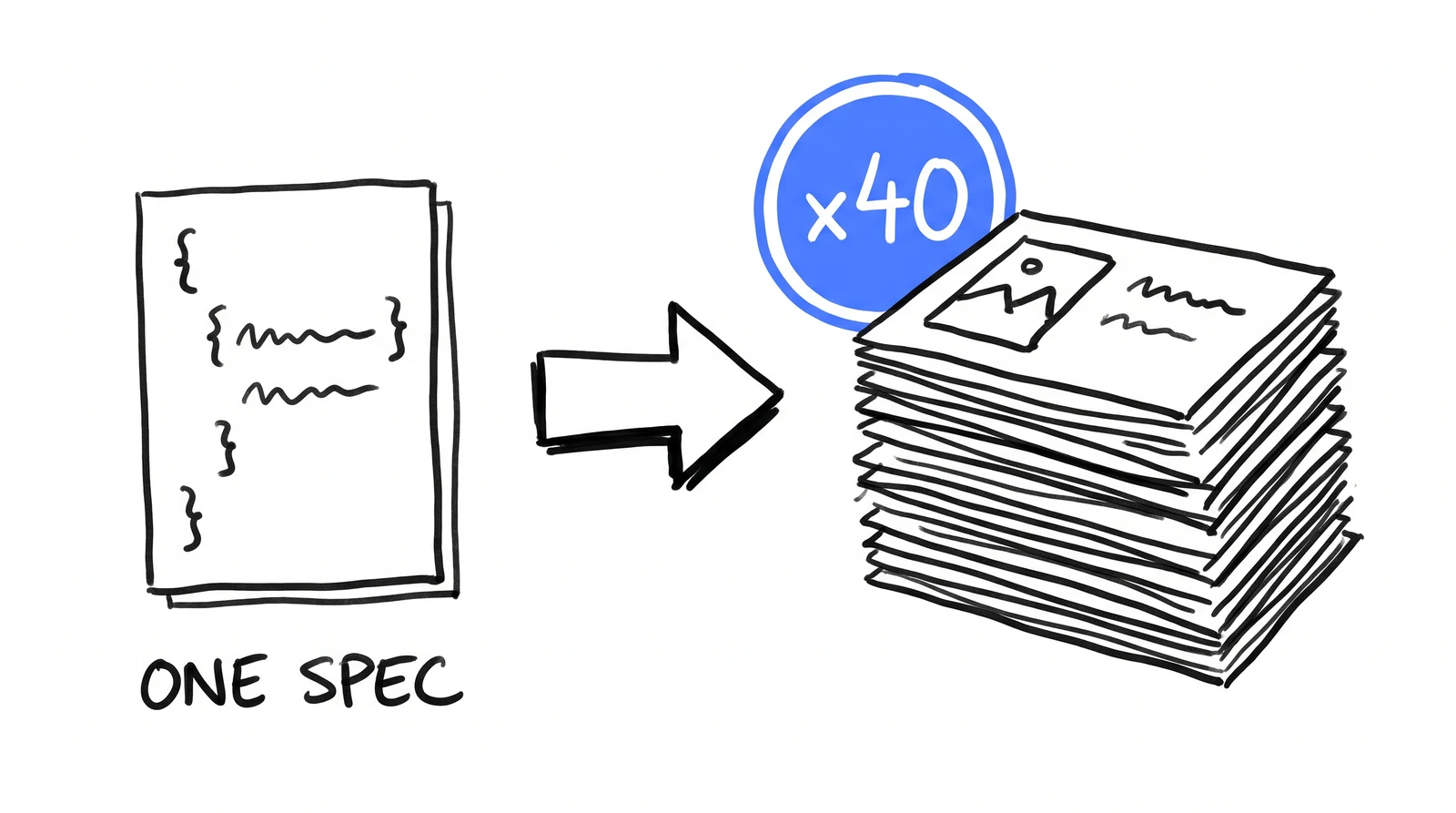
Two things earn their keep: a text whitelist, and never ask for a count. Models cannot count: ask for eight stick figures, get nine, then nine, then six. Draw one and badge it "x8".
doodle-prompt.txt
Hand-drawn whiteboard doodle, pure white background, black felt-tip marker
lines, flat doodle style, NO photography, NO gradients, NO shading, generous
white space. Exactly ONE accent color: bright blue (#4D7CFF), used sparingly.
All labels are short UPPERCASE hand-lettered words. Every text label appears
EXACTLY ONCE, never repeated. Do not write any word on, above, under, or
near any drawn object unless it is in the whitelist.

<describe the scene, anchoring each label to a specific object:
 "a waving flag (label "DONE" directly under the flag)">

The image contains EXACTLY these 2 pieces of text and NO other words
anywhere: 1) ONE SPEC 2) x40.
And the reference prompt, for the next one
Rung 4, in advance. Pass an approved design alongside it. Name every text region verbatim or ban it explicitly — an unnamed region comes back as confident gibberish, beautifully set.
reference-prompt.txt
Follow the reference image's exact design system: same layout, same visual
hierarchy, same proportions, same colour roles, same type treatment.

Change only the content:
  Headline:  "<your headline, exactly as it must appear>"
  Subhead:   "<your subhead, exactly as it must appear>"
  CTA:       "<your cta, exactly as it must appear>"

Every text region in the image must be one of the strings above. There is
no other text of any kind. Do NOT draw any logo or brand mark anywhere.
Leave the top-left corner clean and empty.
$ next lesson: the reference-driven path
one email per lesson. nothing else, ever.
✓ subscribed. next drop lands in your inbox.
THE INSTALL
Want this running in your agency?
This is one skill out of about fifty. The install puts the whole operating system into your agency in 30 days, done for you, by an operator who runs a 25-client agency on the same system.