Not a demo. One cheap server, eight colleagues on their own Claude Code seats, 53 fixes in five weeks, zero tickets. Every step below is a prompt you paste into Claude Code. The technical files ship in a starter kit you never have to open.
53 fixes shipped0 tickets filed8 seats on one server60s to every seat
01 · WHAT ACTUALLY HAPPENED
A bug nobody reported, fixed by 5:30pm
A project manager hit a date-parsing bug in a client report, worked around it, moved on. No ticket, no message. What any sane person with a client waiting does.
Her session drafted a proposal on its way out. One robot bundled it; another judged it safe, fixed it, checked it, pushed it:
the receipt
commit 9d30a30
Date:   Tue Jul 14 2026

    improve: monthly-report --month silently misparses a
             YYYY-MM value into a garbage range

    Auto-applied from improvement queue (bug, from a teammate).
By 5:30pm the fix was on every teammate's machine. Nobody asked for it. That is the whole system, and you can build it by pasting six prompts.
13fixes auto-applied, unasked
40rules learned from human corrections
54rules read before every build
5teammates triggered fixes without knowing
02 · THE SETUP
One cheap server, a seat per teammate
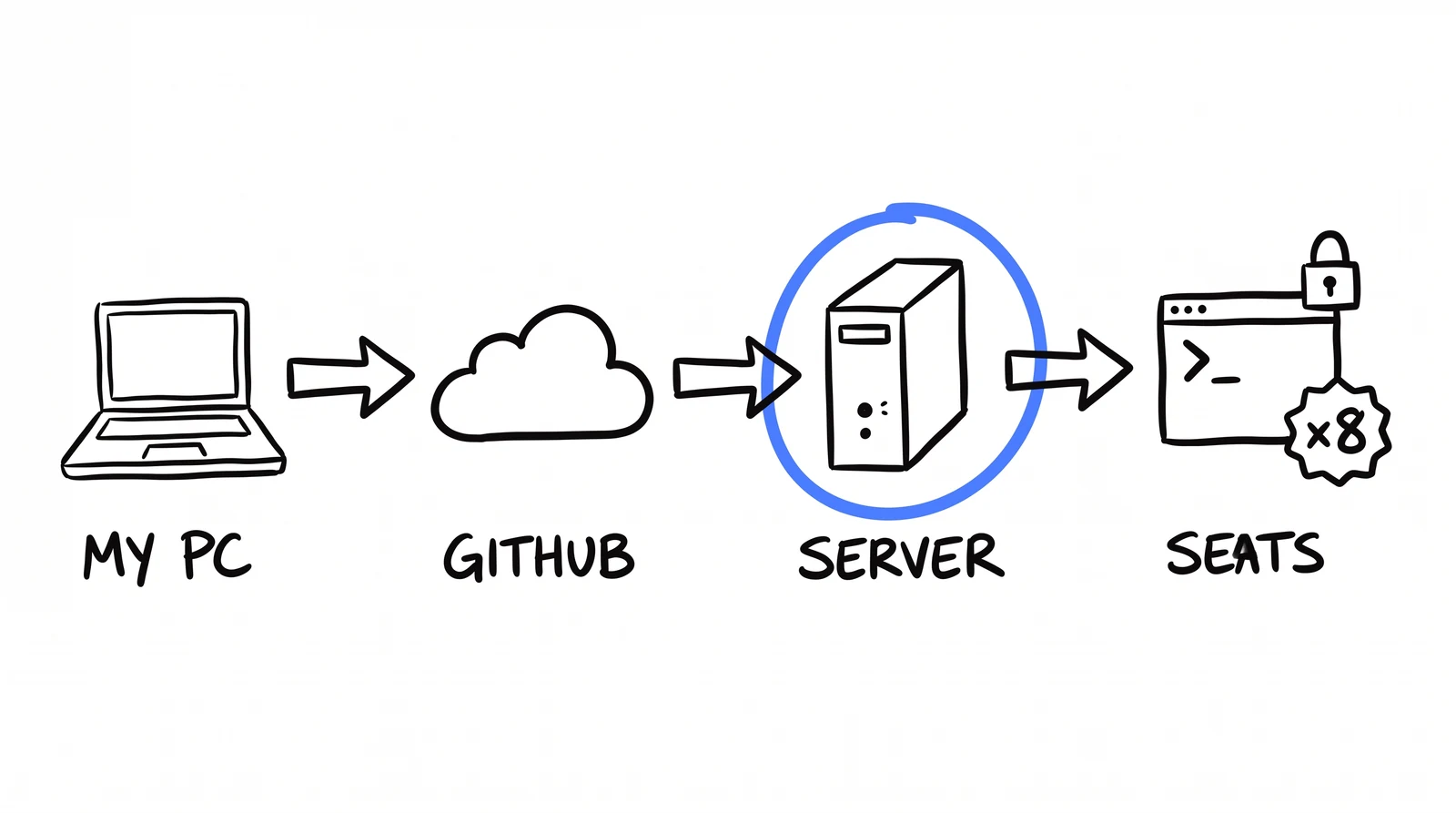
You need three things: your agency's playbook in a git repo, one cheap server (about a lunch a month), and a Claude Code login per teammate. Each teammate gets a seat on the server: their own user, their own copy of the code, their own login.
one box. eight seats. the code only flows one way.
Code changes in one place: your machine. You push, the server pulls within a minute, every seat syncs two minutes later. Seats hold no GitHub keys, so nothing a seat does can flow back upstream.
prompt 1 — add a seat (paste into Claude Code on the server)
You are on my Ubuntu server as root. Add a Claude Code seat for my
teammate <name>:

1. Create a Linux user <name>.
2. Clone our repo into their home folder FROM THE SERVER'S OWN COPY,
   not from GitHub. A seat must hold no GitHub credentials.
3. Install Claude Code for them. They sign in with their own account
   on first run.
4. Set SANDBOX=1 in their shell so every session on this seat runs
   sandboxed.
5. Schedule their clone to pull the latest code every 2 minutes.
03 · THE SANDBOX
A seat can use everything and change nothing
Every action a seat takes passes a guard first. A teammate can run every skill, read the playbook, ship client work. They cannot touch the system, and cannot even read the secrets file, because a seat that can read secrets can leak them.
what a blocked edit looks like
> edit .claude/skills/monthly-report/SKILL.md
sandbox_guard: DENY — write to protected path:
.claude/skills/monthly-report/SKILL.md(Sandboxed seat. To change the codebase, write a proposal —
it goes through review, not around it.)
You don't write this guard. You describe it:
prompt 2 — build the sandbox guard
Build a sandbox guard for this repo: a hook that checks every tool
call before it runs, whenever SANDBOX=1 is set.

BLOCK writes to: .env, .claude/, CLAUDE.md, .git/, package.json,
anything named secret / credential / token.
BLOCK reads of .env and credential files.
BLOCK commands: git push, git commit, sudo, rm -rf, npm install,
ssh, and curl piped into a shell.
Catch redirects too: `echo x > .env` counts as a write to .env.
ONE allowlist: the seat's own memory folder.

When you block something, show the reason and add: "To change the
system, write a proposal. It goes through review, not around it."
If the guard itself errors, deny. Fail closed.
The exception: live pages can't wait a day
A seat may edit a client's landing page, but it holds no deploy keys. The edit goes into a queue, a privileged runner deploys it. Live in about a minute.
a seat edits a live page
> swap the hero photo on the client's lander
✓ edited the page source (allowed — not system code)✓ queued for the deploy runner (the seat has no deploy keys)runner: deploy → live in ~60s
04 · THE LOOP
Friction in, fixes out
five stages. one human, for one second.
Nobody reports bugs. Reporting is a favour to future people, and future people don't have today's deadline. So the system asks instead: when a seat's session ends, it reviews itself once. Did anything here deserve a fix? If yes, it writes one proposal file. Most sessions write nothing, by design.
prompt 3 — session self-review (fires automatically at session end)
SESSION-END SELF-REVIEW (automatic, keep it under ~30s). Before this
session ends, reflect ONCE on whether anything here is worth improving
the SHARED system. This is not a summary of the work you did.

Write a proposal ONLY if the session surfaced one of these:
- a bug or silent failure in a skill / script / agent,
- a documentation gap (a doc was wrong, missing, or misleading),
- a missing skill or feature that would have saved real time,
- a config gap (missing or incorrect entry in a config file),
- a footgun / platform quirk that future sessions will re-hit,
- a manual workaround you had to repeat that should be automated.

Do NOT write a proposal for: routine task completion, a one-off
deliverable, normal expected work, or anything specific to only this
one request. MOST SESSIONS HAVE NOTHING TO PROPOSE. That is the
correct, expected outcome. Do not invent one to seem useful.

If (and only if) something genuinely qualifies, write ONE file to
~/scratch/improvements/<slug>-<timestamp>.md using the template.

Hard rules for this review turn: you may ONLY write to that folder.
Do NOT start new work, do NOT run commands, do NOT edit anything else,
do NOT message anyone. Write the single file (or nothing at all),
then stop.
The load-bearing line: "MOST SESSIONS HAVE NOTHING TO PROPOSE." Without it, every session proposes and the digest becomes noise.
At 17:00 every seat's proposals become one digest on your phone, an Approve button per item. A thumb tap. At 17:30 a robot applies what you approved, one change at a time, behind a gate.
prompt 4 — build the queue robot
Build the improvement queue. Two scheduled jobs on my server:

17:00 daily — collect every proposal written today, across all
seats, into one digest with an Approve button per item. Send it
to me.

17:30 daily — for each approved proposal:
1. Sort first. Doc fixes and config backfills may auto-apply.
   Bugs auto-apply only if low or medium severity AND scoped to
   one skill. Everything else waits for a human, including any
   proposal that even mentions secrets, tokens, billing, payments,
   spend, ad accounts, webhooks or git push.
2. Apply ONE proposal at a time, as the minimal change it
   describes.
3. Never trust the worker's report of what it changed. Ask git.
   If the real changed-file list touches .env, .git, hooks,
   settings, anything that spends money, or this queue itself:
   revert everything and hold the proposal for me.
4. Syntax-check every changed file. One commit per proposal, the
   proposal's fingerprint in the message. Then push.

Start in shadow mode: report what you WOULD have done, apply
nothing, and leave unapplied proposals pending. Never mark them
processed.
The line that keeps this safe: never believe the robot's report of what it changed. Ask git.
Never read the worker's file list. Ask git.
THE WORKER SAYS
"files": ["skills/report.md"]
ignored → ask git
GIT SAYS
report.md monthly_report.mjs .env ← revert
Allowed to be automatic
AUTO
Doc gaps.
Config backfills.
Bugs — only if low/medium severity, scoped to one skill, no danger signal in the text.
The boring 60% that used to queue for three weeks.
HUMAN
High severity.
Not scoped to one skill.
Mentions a danger signal, even in passing.
New skills, features, process. Judgment.
Doubt → human. A false hold costs 30 seconds. A false apply costs a client.
The kill switch is a file on the server. Anyone who can reach the box can stop the whole loop in one second.
05 · ENGINE TWO
It also learns from what humans fix
say vs do. the second signal is honest.
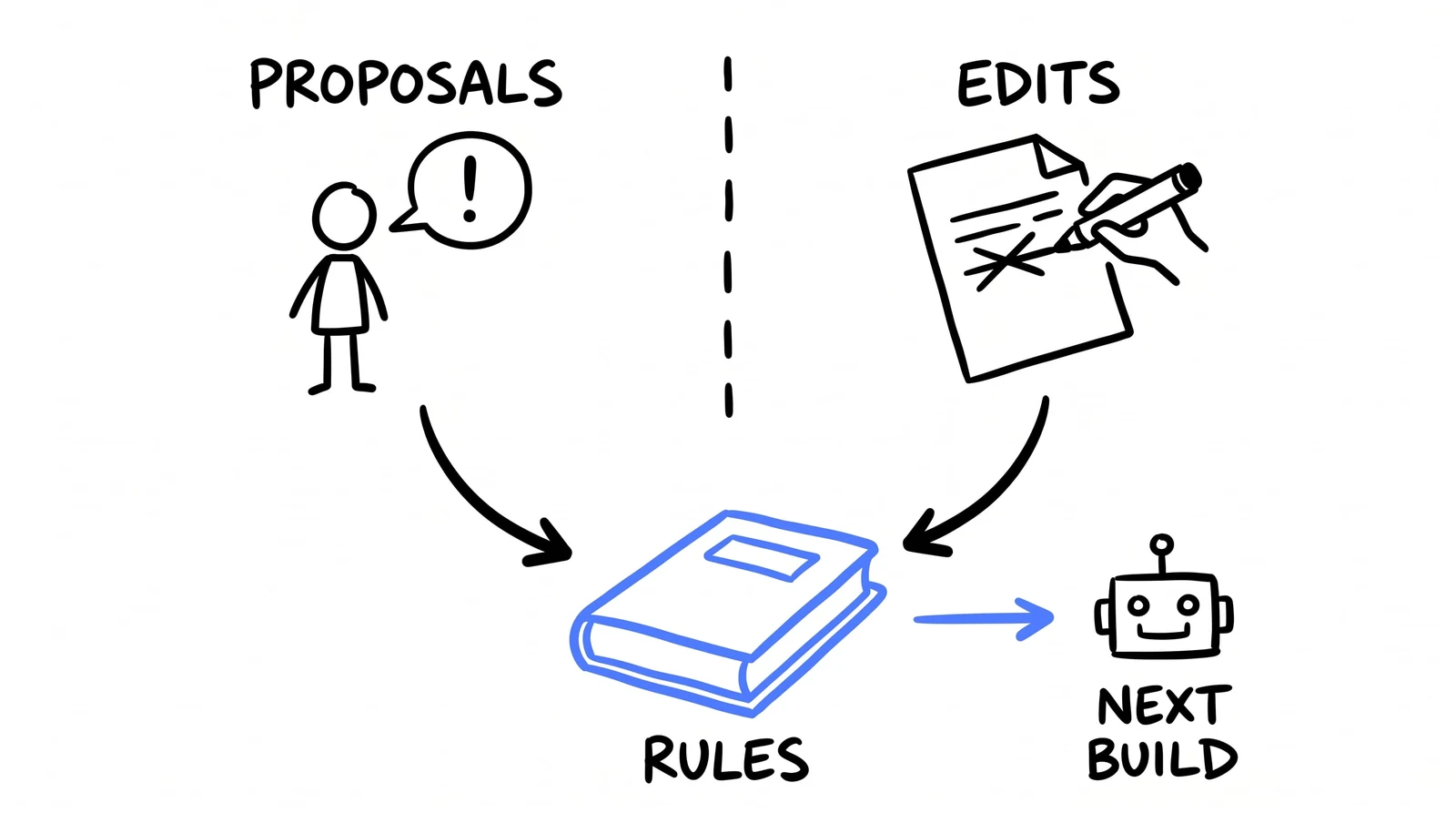
The queue captures what people say. Engine two captures what they do: a teammate moving the lead form up the page is the lesson, and nobody writes it down. Once a day the system reads those edits and turns the repeated ones into rules the next build must follow.
prompt 5 — build engine two
Build engine two, the learn-from-edits engine:

1. Whenever a teammate edits something a skill built (a page, an
   ad, a report), log one line: who, which client, what changed.
   No forms, no tickets. The skill logs it itself.
2. Once a day, read the day's edits and extract GENERAL lessons:
   build rules the next run should follow. Good: "the lead form
   goes right under the hook, above the story." Not a lesson:
   one client's typo, or a one-off wording tweak.
3. Promote a lesson to a rule only if two different edits support
   it, or the model is at least 85% sure. Skip anything already
   covered by an existing rule. The model WILL re-propose what it
   already knows, so add a duplicate check.
4. Append rules to a LEARNED_RULES.md inside the skill's folder,
   and make step 0 of that skill: read this file before building
   anything.
One person is an opinion. Two people on two clients is a rule.
06 · TURN IT ON
The whole loop is five scheduled jobs
No queue service, no dashboard. One server, five schedules. I built the fancy version first and deleted it.
the day, in plain words
17:00        today's proposals  →  one digest  →  your phone
17:30        approved  →  sort  →  apply  →  gate  →  push
every 1 min  the server pulls the latest code
every 2 min  every seat syncs from the server
daily        engine two turns today's human edits into rules
The half hour between digest and robot is where you say no. And run shadow mode for the first two weeks: the robot reports what it would have done and touches nothing. The next section is why.
07 · WHAT BROKE
Three ways it quietly did nothing
Every one of these ran daily, reported success, and accomplished nothing.
1. Shadow mode burned the queue
Shadow runs marked safe proposals "processed" without applying them — flipped live, skipped forever. Fix: in shadow, leave would-apply proposals pending.
2. Skipped every run for weeks
The robot refuses to work on a half-edited repo (correct — else it commits half-finished work). Another job rewrote a config file constantly: always "half-edited", every run skipped into a log nobody reads. Fix: allowlist expected drift; report skips where humans look.
3. Then it happened twice more
Same class, different files. Same useless "skipped" line in a log nobody opened.
The lesson: a robot reporting "skipped" to a log file is indistinguishable from one doing its job. Make it tell you where you look, or don't build it.
08 · THE FILES
The technical guts, in one download
Everything this page skipped on purpose is in the starter kit: the sandbox guard, the safety gate, the triage rules, the session-end hook, the duplicate check, sample learned rules, the exact worker prompts, the five schedules. Real files from the live system, scrubbed, zero dependencies. You don't have to read them. Claude does.
I unzipped starter-kit.zip into my repo. Read its README, explain
each file to me in one sentence, then wire it in: the session-end
hook, the gate and triage rules into the queue robot from prompt 4,
and the LEARNED_RULES step 0 into one skill. Shadow mode on.
ia_ — updates
$ subscribe --to "the next drop" # New guides, new skills, new teardowns like this one, when they ship. # No spam. No gate. This page stays free either way.
✓ subscribed. next drop lands in your inbox.
unsubscribe = one reply. we read those.
DONE-FOR-YOU
Want this installed in your agency?
This page is the self-serve version. The Install is done-for-you: your skills, your agents, your clients, live in 30 days.