Never send from your company mailbox, you'd burn the domain your clients email you on. Use separate domains, warmed first.
The napkin math
10 emails per inbox per day is the ceiling. Ten looks like a person, a hundred looks like software. Volume is an inbox count:
inboxes = emails per sending day ÷ 10, domains = inboxes ÷ 3
300 a day → 30 inboxes, 10 domains
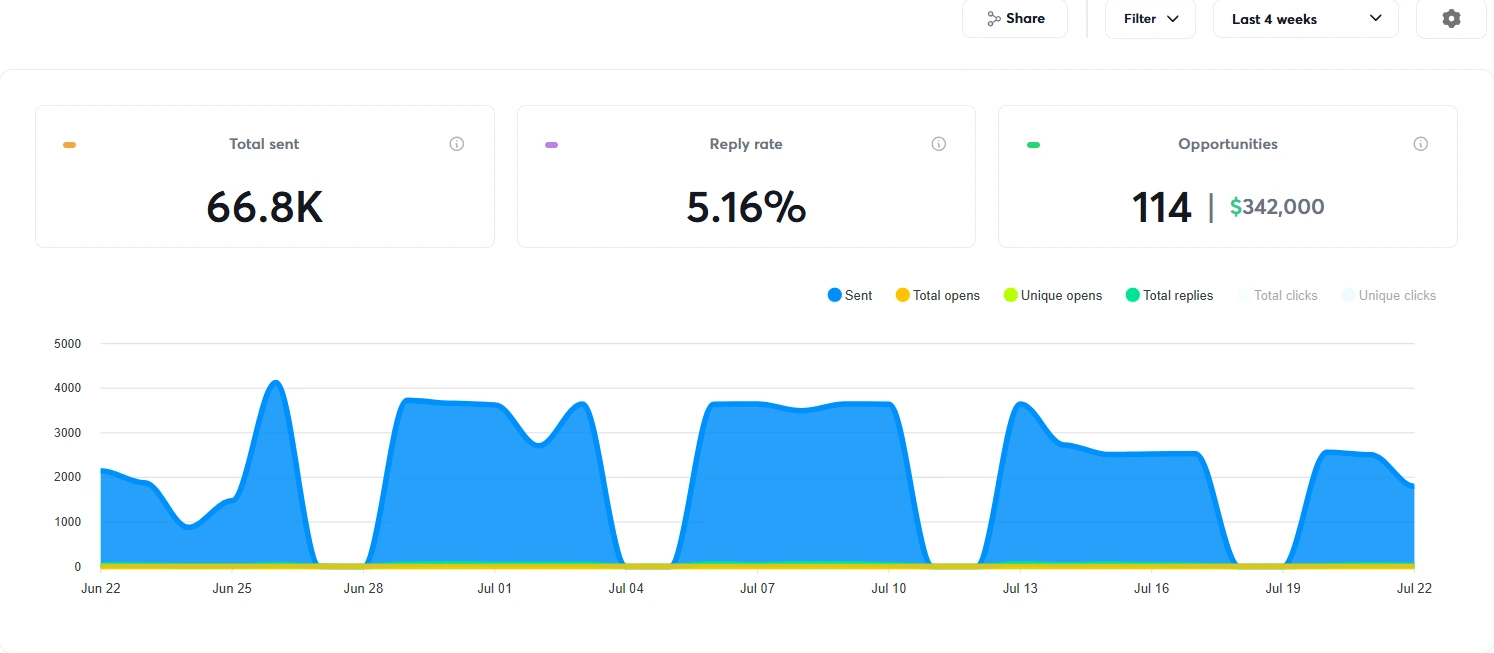
This page, near 4,000 a day → ~400 inboxes, ~130 domains
The second number is what volume really costs. Start at the first tier.
What to do
Buy domains, never your main one. ~$10/year.
Redirect each to your real site.
~3 mailboxes per domain, real names. Not info@.
Set SPF, DKIM, DMARC. Skip them and you're filtered before you start.
Turn on warm-up, wait two to three weeks. Nothing visible happens, which is why people skip it and why their campaign dies in week one.
Send nothing real during warm-up. You get one reputation per domain, and rebuilding a burned one is slower than warming a fresh one.
STEP 210 minutes
Connect Claude to your sending tool
I use Instantly. Once Claude has the key it pulls the account itself, so "how are we doing" is answered in the chat.
Settings → Integrations → API keys → create one.
Add one line to .env: INSTANTLY_API_KEY=your_key
Save. A key lives there and nowhere else.
Then paste this:
Prompt 1 — connect & report
I've added INSTANTLY_API_KEY to my .env file.

Connect to Instantly and show me every campaign in the account. For each
one, windowed to the last 30 days: emails sent, unique replies, bounce
rate, and opportunities created.

Use the Instantly v2 API. One thing to know: their leads endpoint filters
on "campaign", and if you pass "campaign_id" instead it is silently
ignored and you get the entire workspace back with no error. The tell is
identical totals for any id you pass, so sanity-check that.

If any call fails, tell me exactly which one and what the error body
said. Don't guess and don't retry the same call twice.

Then write a short note in the repo explaining how to re-run this, so I
never have to ask for it twice.
STEP 315 minutes
Compile the ICP
A sourcing tool has three boxes: where, what business, whose job title. Write the ICP in those terms or it's a wish. This prompt translates yours and names what it dropped.
Prompt 2 — compile the ICP
I want to build a cold email list. Here is my customer in plain English:

<3-5 sentences about who actually buys from you, and why>

Compile that into a sourcing spec with EXACTLY these fields:
  - query: the business-type search string a business database would
    understand ("real estate agency", "dental clinic", "law firm")
  - geo: specific cities or metros, with a radius in km. Most geo tools
    cap the radius around 25km, so list metros, don't say "the USA".
    Order them BIGGEST MARKET FIRST.
  - titles: which decision-makers, from this set only: ceo, marketing,
    operations, sales, hr, finance
  - per_metro_cap: how many results per location

Then, separately and honestly:
  1. List every part of my description that CANNOT be expressed in those
     fields. "Ambitious", "growth-minded", "frustrated with their current
     agency" are not filters. Do not silently drop them — name them.
  2. For each, tell me whether it belongs in the EMAIL COPY instead
     (most do) or means I need a different sourcing method entirely.
  3. Estimate the list size. Under 2,000 and it's too narrow to run as
     cold email — tell me exactly what to widen. Over 50,000 and it's
     too broad to write one good angle for — tell me where to split it.

Don't write any email copy yet. Just the spec and the honest gaps.
Why "name the gaps" matters. Without it a model silently turns "ambitious agencies who value marketing" into query: "marketing agency", and you pay for a list without them.
STEP 41-2 hours
Build the list
I used to run a scraping stack: actors, proxies, a parser that broke whenever a site changed. These go straight from geography and business type to emails.
Pick one source
AnyMail Finder — GeoLead what I use
Coordinate, radius, business type → name, email, phone. Local businesses.
Instantly Lead Finder simplest
Built into the sending tool. One vendor.
Findymail / Apollo title-led
For ICPs defined by job title, not geography.
Your own CRM export free
Dead leads and old enquiries. Still needs the gate.
Same prompt either way. Key into .env first.
Prompt 3 — build the list
Build me a cold email list from this spec:

<paste the sourcing spec from the last step>

Use <AnyMail Finder's GeoLead / Instantly's lead finder / Apollo>. The API key
is in .env. My hard budget for this run is <amount> credits.

Rules I need you to follow exactly:
  - Work through the locations one at a time, biggest market first.
  - With most of these tools, creating a search and seeing the result
    count is FREE and you are only charged on download. Find that
    boundary and put my budget check exactly there: read the quoted
    cost, and if it would take me over budget, STOP the whole run.
    Don't skip ahead to a cheaper location.
  - Save progress to a file after every single location, so if this
    dies at 90% I can resume without paying twice for what I already
    bought.
  - Dedupe on email address. Also, if I give you an export of people
    already in my sending tool, exclude those before downloading —
    I don't want to pay to rediscover someone already in a sequence.
  - Save the result as a CSV I can open and look at.

When you're done tell me: total unique leads, credits spent, cost per
lead, and which locations you did NOT reach because the budget ran out.
Name them — don't let a truncated run look like full coverage.

Then stop. This list is not safe to send to yet.
STEP 530 minutes
Run the verification gate
Read this twice. Every other step is performance. This is survival.
What happened to me: I filtered on the sourcing tool's own "valid" flag, which felt like verification. That list bounced at 5.3% and the platform paused my account. "Valid" means the domain exists, not that a mailbox accepts mail.
The second screen recovers what the first throws away.
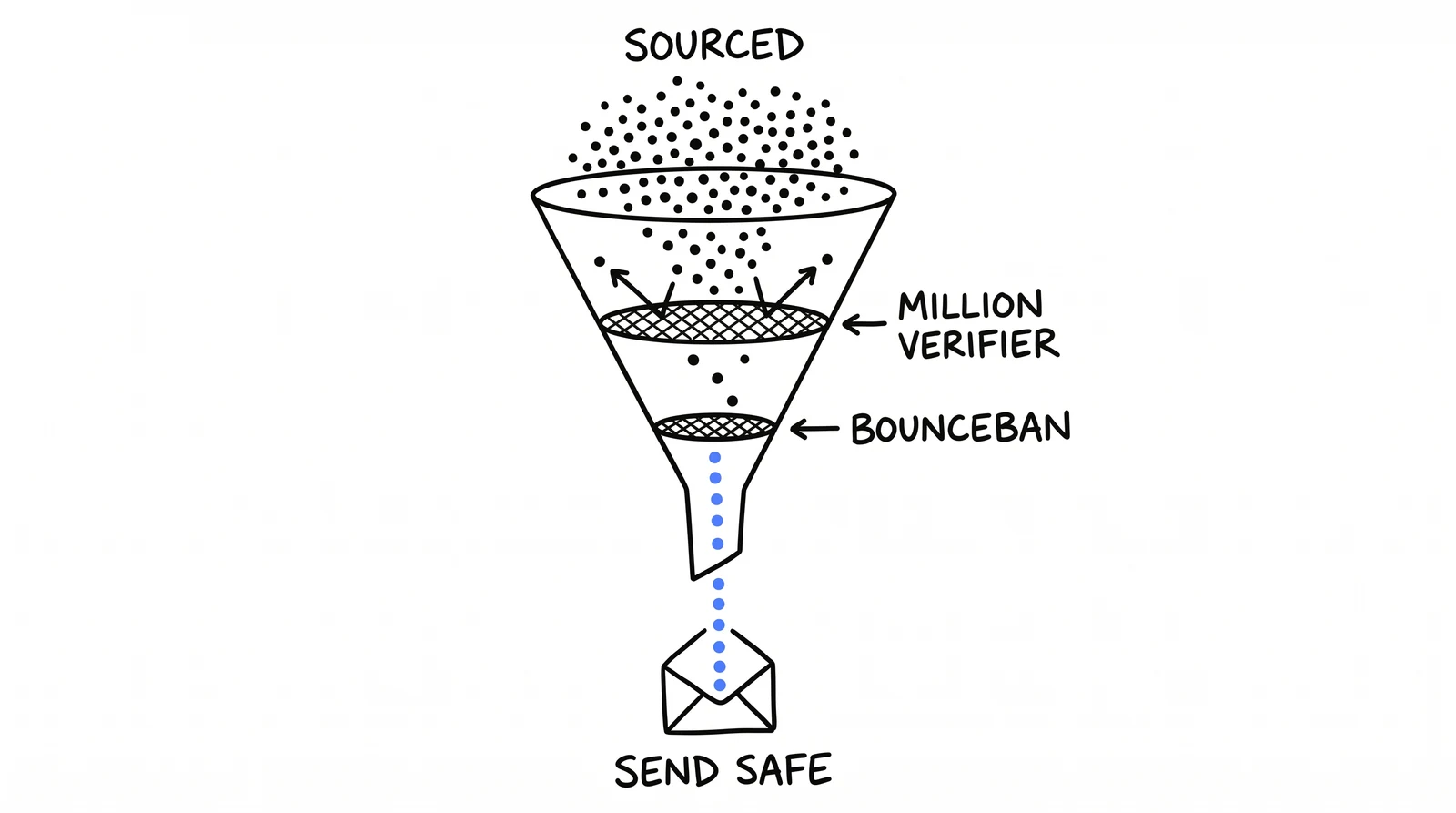
Two verifiers. The first settles most of the list. The second rescues what it can't test: catch-all domains accept everything, so they come back untestable. Dropping them costs a third of a good list.
Prompt 4 — the verification gate
Take the lead list you just built and make it safe to send to. Do not
skip this — an unverified list will get my sending account paused.

Two gates, in this order:

GATE 1 — MillionVerifier (key in .env)
  Run every address through it. Keep ONLY result "ok".
  Drop invalid, unknown and disposable, permanently. Don't soften this,
  "unknown" is not "probably fine".
  Hold the "catch_all" results aside — they are NOT junk, MillionVerifier
  simply cannot test a catch-all domain.

GATE 2 — BounceBan (key in .env), on the catch_all pile ONLY
  Note: it wants the raw key in the Authorization header, not "Bearer key".
  Keep result "deliverable". Drop risky and undeliverable.
  Never send gate 2 anything gate 1 already settled — that's wasted money.

FINAL KEEP = gate 1 "ok" + gate 2 "deliverable"

Cache every result to disk as you go, so a crash doesn't make me pay to
re-verify thousands of addresses.

Report back: how many in each bucket, the keep rate, and the bounce rate
you'd project. If the keep rate is under 60%, STOP and tell me the source
list is bad. Verification is not a laundry service for a bad list.
After the gate: ~1% across 66,800 sends. A cent per address, the cheapest insurance here.
STEP 630 minutes
Write the 4-step sequence
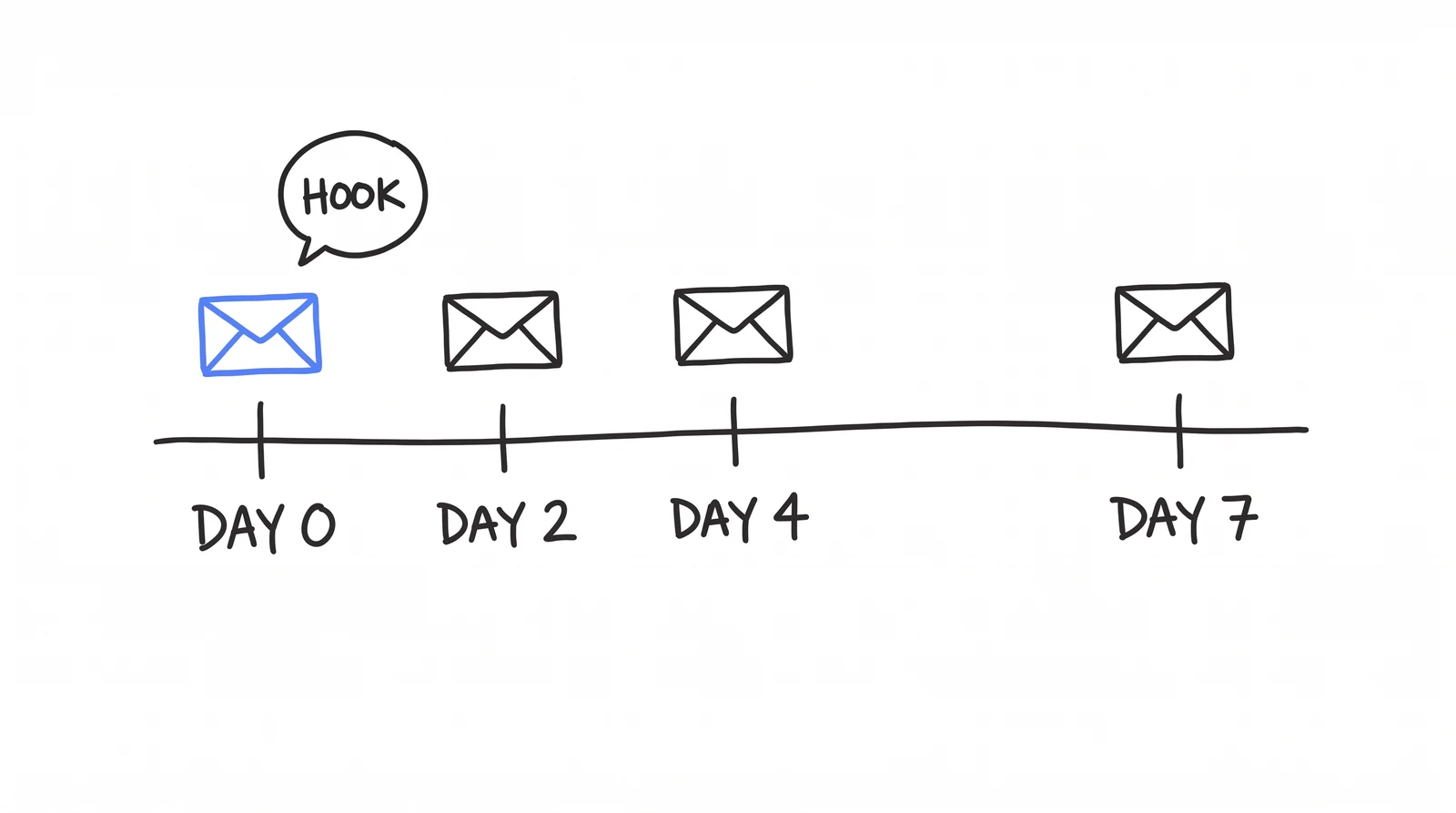
Four emails in a week, one offer from four angles, stopping the instant someone replies.
The hook carries the load.
DAY 0
The hook
Has a subject. 2 variants.
DAY 2
The bump
No subject, threads under email 1. Four lines.
DAY 4
The pivot
New subject. 4 variants. A different angle.
DAY 7
The close
No subject. "Last one from me." No guilt.
Prompt 5 — write the sequence
Write my 4-step cold email sequence.

My offer: <one sentence>
Who it's for: <the ICP from step 3>
Proof I can use: <real client names, real numbers>

Structure, exactly:
  EMAIL 1 — day 0 — has a subject — 2 variants
    Opens on something about THEM, not about me. Problem in ONE
    sentence. One piece of named proof with a real number. The ask is
    a two-word reply ("Want it?"). No calendar link, no attachment.
  EMAIL 2 — day 2 — NO subject, so it threads under email 1 — 1 variant
    Four lines. Adds ONE detail email 1 didn't have. Re-asks the same
    question. Banned: "just circling back", "bumping this up".
  EMAIL 3 — day 4 — NEW subject — 4 variants
    A genuinely DIFFERENT angle, not a louder repeat. New subject
    because it's a new idea and deserves a new open.
  EMAIL 4 — day 7 — NO subject — 1 variant
    "Last one from me, won't keep nudging." No false scarcity, no
    "should I close your file?". End with a real out: "All good
    either way."

Rules: no em-dashes. No "I hope this finds you well". Short sentences,
one idea each. ONE offer across all four emails. Every number must be
one I gave you — if you need a number I haven't given you, ask me for
it. Never invent proof, a client name or a statistic.

Before you show me anything, score your own draft 1-10 on each of these
and rewrite anything under 9:
  1. Would a real person actually SAY this out loud, without cringing?
  2. Is email 3 a different ANGLE, or the same angle louder? Be strict.
  3. Does every claim carry a number or name I can source?
  4. Could email 4 be read as guilt-tripping?
Tell me the final scores when you deliver.
STEP 720 minutes
Launch it with the right settings
Prompt 6 — build the campaign, paused
Push the verified list into Instantly and build the campaign for me,
but leave it PAUSED. I'll launch it myself after I've looked at it.

Settings, exactly:
  - 10 sends per inbox per day. Not more. If I want more volume the
    answer is more inboxes, never a higher number here.
  - Stop on reply: ON. Stop on auto-reply: ON.
  - Open tracking: OFF. Link tracking: OFF.
  - Unsubscribe header: off.
  - Schedule: Monday to Thursday, 08:00-17:00, in the LEAD's timezone.
  - Delays between the four steps: 2, 2, 3 days (so day 0, 2, 4, 7).
  - Send the email bodies as HTML, and check the line breaks survived.
    Sent as plain text they collapse into one wall.

Load the 4 emails and their variants from the sequence you just wrote,
word for word. Do not rewrite, shorten or "improve" any of the copy on
the way in.

Then show me the campaign and confirm it is paused.
Open tracking off. It puts an invisible pixel in every email, so every message loads a file from a third-party domain: a spam signal you inflicted on yourself. Open rate has been fiction since Apple began pre-fetching images in 2021, and replies need no pixel.
STEP 8the payoff
Let the agent book your calls
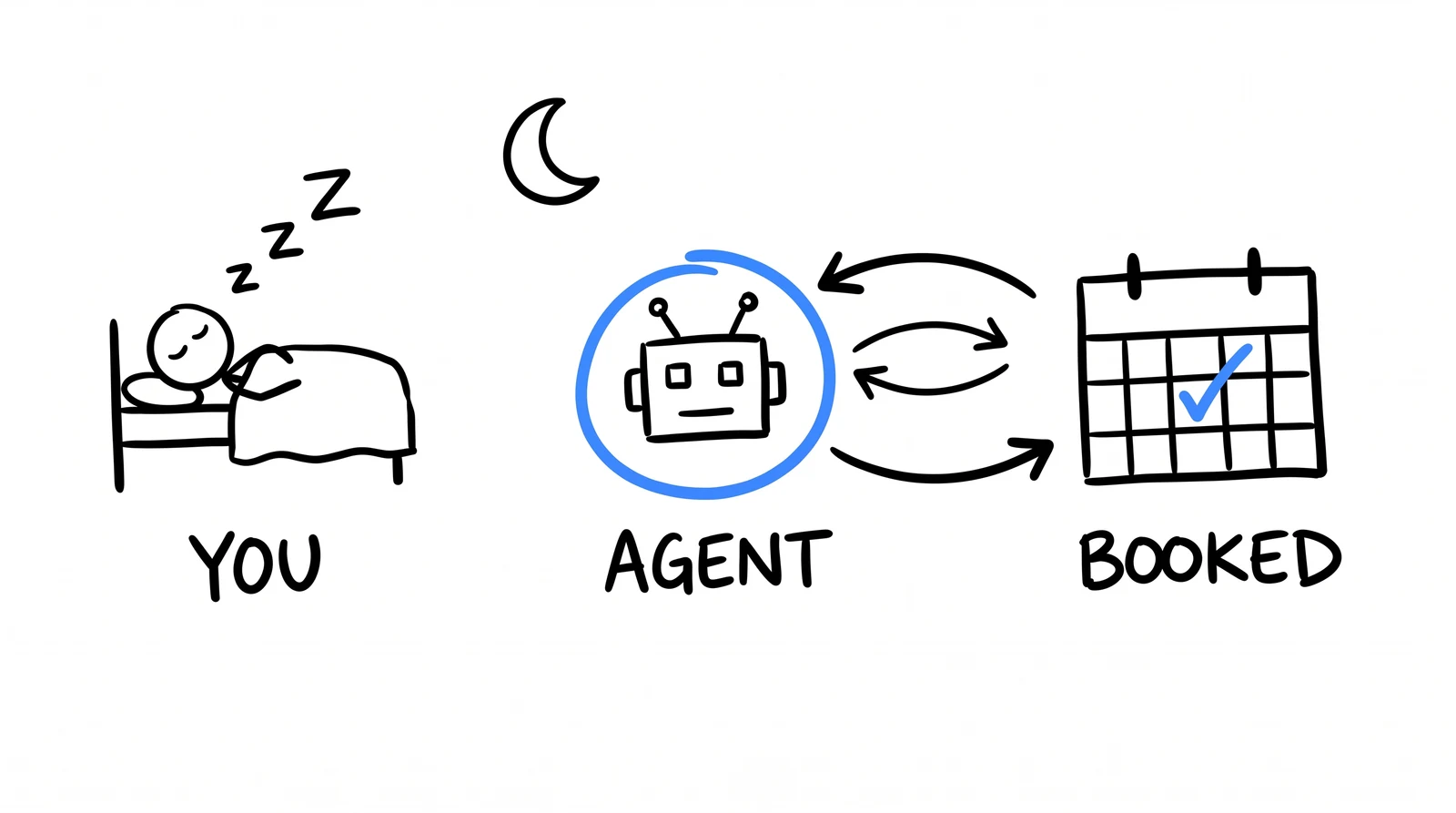
Everything so far is a sending machine. This is the part nobody builds. My leads are in Reno and London, I'm in Sarajevo, so the replies land while I'm asleep. One that sits fourteen hours is dead.
They reply at 07:51 their time. It answers anyway.
Prompt 7 — the reply agent
Watch the inbox for campaign <name> and handle every reply. Check
every few minutes. Here's exactly how.

1. STRIP THE QUOTED THREAD FIRST, then classify only the lead's NEW
   words. This matters more than anything else here: if you read the
   whole email you'll read my own quoted proposal back to yourself and
   book someone who just declined. That has actually happened to me.

2. Classify as one of: interested / question / objection / out of office
   / wrong person / decline / hostile.
   If you can't tell interested from question, say question. If you
   can't tell question from decline, say decline. Always resolve toward
   the less aggressive action.

3. If it's a plain "no thanks": ONE short, warm, no-pitch reply
   ("Thanks for letting me know, all the best"), then never contact
   them again. Being gracious about a no is also good for my domain
   reputation.
   If it's hostile, or mentions spam reports, lawyers or GDPR: send
   NOTHING at all and suppress them. Replying there invites a complaint.
   If it's out of office: wait two days, don't reply.

4. If it's interested or a question, draft the reply:
   - 2 to 5 sentences. They wrote three lines, not an essay.
   - No pitch. They already replied. The only job is getting a time.
   - Work out their timezone from their city and state.
   - Offer exactly two real free slots from my calendar, phrased in
     THEIR timezone ("Wednesday at 10am your time"). Only ever offer
     times that are genuinely free — never invent availability.
   - Anchor near-term: tomorrow or the day after. Only reach into next
     week if it's already Thursday or Friday where they are.
   - If they give a phone number or ask me to call them, the answer is
     YES. That's a buying signal. Never invent a limitation like "we
     don't make outbound calls" — that has cost me a live deal before.

5. Only send inside THEIR local business hours, Monday to Friday
   08:00-18:00. If it's outside those hours right now, hold the draft
   and send it at their next opening — and make sure something actually
   sends it later. A held reply that nothing ever sends is a lead I
   lose silently, and I won't notice.

6. Book it the moment they agree a time. If their yes is vague ("yeah
   that works") with two slots on the table, ASK WHICH. Never default
   to the first one.

7. Stop and hand it to me if: they're frustrated, they say yes twice
   without giving a time, they try to book themselves and it's not
   working, or they ask something my offer doesn't cover. Tell me why
   you escalated.
Those rules are scars. "Strip the quoted thread" exists because it once booked a woman who replied "No, thank you". "Never invent a limitation" because the bot claimed we don't call people.
Where this actually runs
The one part needing more than a prompt. Your laptop closes and the agent stops. This needs a machine that doesn't sleep.
By hand free
Paste prompt 7 morning and evening. Lose the speed, keep the rest.
A small cloud server what I use
~€5/month, on a schedule all night. Any always-on box you already have works too.
Not your Mac at home avoid
Sleep and reboots stop it silently. You won't notice for days.
Not a developer? This one waits at each step:
Prompt 8 — put the agent on a server
I want the reply agent from the last step running 24/7 on a small cloud
server instead of my laptop, so it keeps working when my machine is off.

What I have right now: <nothing yet / a fresh Ubuntu server at Hetzner
or DigitalOcean / an existing server>

I am not a developer. Walk me through this ONE STEP AT A TIME and wait
for me to confirm each step worked before you move to the next. Tell me
exactly what to type and what I should expect to see back.

Cover, in this order:
  1. Creating the server and connecting to it securely.
  2. Installing what's needed to run Claude Code on it.
  3. Getting my API keys onto it safely. They go in an environment file
     that is never committed to git and never pasted into a chat.
  4. Running the reply agent on a schedule, every few minutes.
  5. Making it start again by itself if the server reboots.
  6. A heartbeat: something that alerts me if it has not run
     successfully in the last hour. Silence must not look like success
     — a dead agent and a quiet inbox look identical from my side.

Before any step that could break something or cost money, tell me first
and wait. If a command fails, read the actual error to me and tell me
what it means, don't just try something else.
Run it by hand for a week first. An unproven agent on a server is how you wake to twenty wrong emails.
TAKE THE FILES
The skills, not just the prompts
The prompts get you through once. These make it repeat: our real files, client names swapped for placeholders. Skills go at .claude/skills/<name>/SKILL.md, agents at .claude/agents/<name>.md.